> For the complete documentation index, see [llms.txt](https://help.tellius.com/llms.txt). Markdown versions of documentation pages are available by appending `.md` to page URLs; this page is available as [Markdown](https://help.tellius.com/6.0/getting-started/admin-guide/tellius-architecture.md).
# Tellius architecture
Overview of the Tellius architecture, including the Web UI, search engine, ML engines, distributed storage, and scalable deployment across on-prem or cloud environments.
The Tellius architecture is designed to be user-friendly and easily accessible, allowing for seamless integration with existing systems.
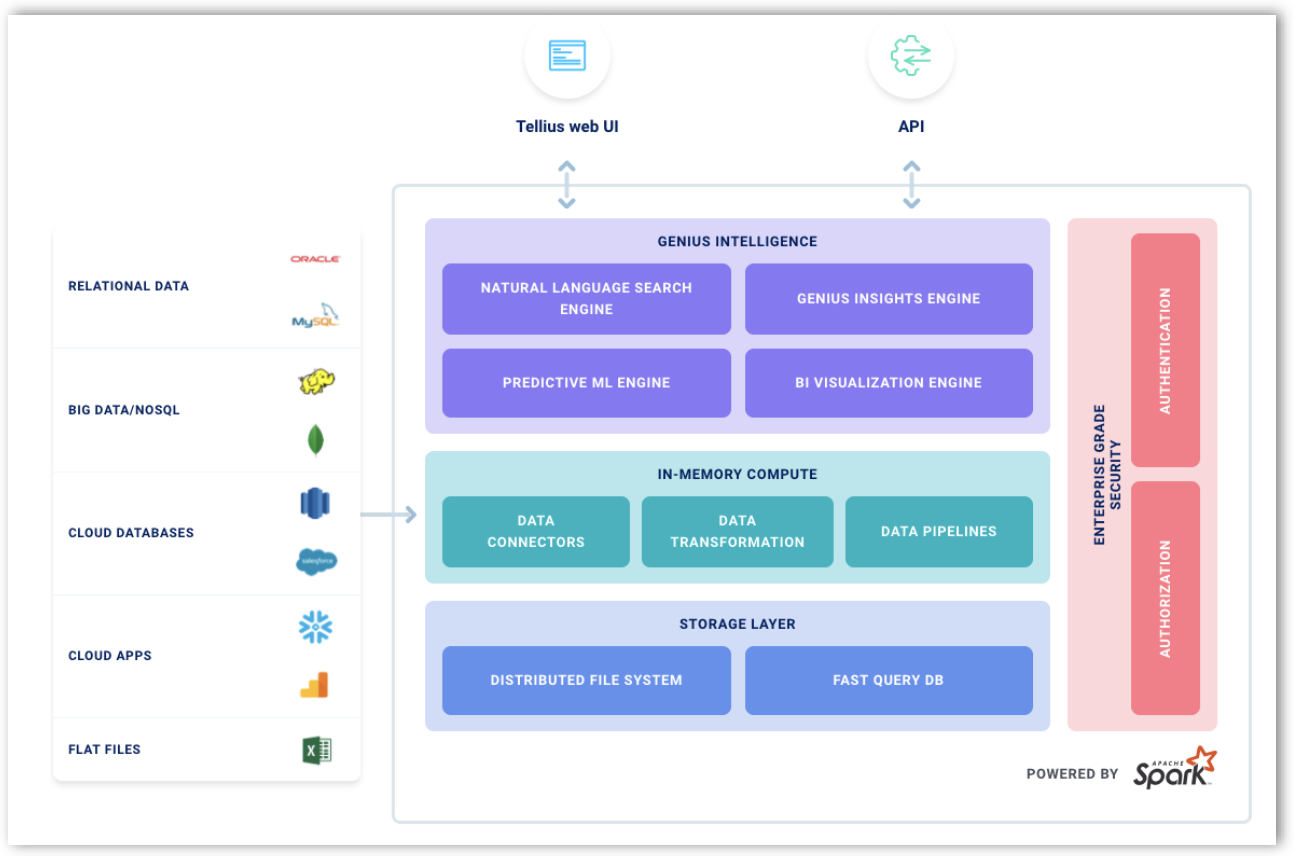
Tellius Architecture
The Tellius architecture consists of the following components:
* The main entry point to Tellius is the **HTML5-based Web UI**, which runs in a web browser.
* **Natural Language Search** allows users to input natural language queries, which the engine then converts into backend queries for processing.
* The **Genius Insights** engine uses advanced machine learning algorithms to automatically discover actionable insights.
* The **Predictive Machine Learning** engine enables the training of custom machine learning models for making predictions
* **Distributed Filesystem** is responsible for storing intermediate data generated by Machine Learning and Genius Insights engine. Optionally, it can be used for storing data when explicitly enabled.
* **Fast Query Database** is a columnar store for storing data in indexed format for real-time search and visualization on big data. This is a cost-effective option when data cannot fit in available memory and high performance is still desired.
### **Deployment architecture of Tellius**
Tellius can be deployed on-premises behind a firewall or in any of the major cloud technologies such as,
* Amazon Web Services
* Microsoft Azure
* Google Cloud
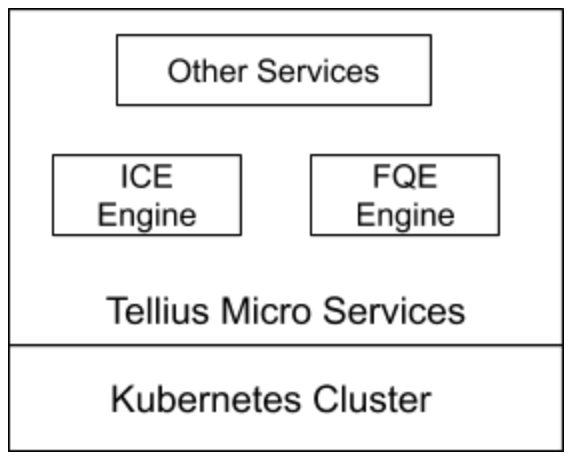
Here is an illustration of the deployment architecture of Tellius:
Deployment architecture of Tellius
The components are,
1. **Kubernetes Cluster:** It is a cluster of Kubernetes on one or more nodes.
2. **Tellius Microservices:** All the services related to Tellius will be running on the Kubernetes cluster, including,
* **Fast Query Engine (FQE) microservice**, which is responsible for running the FQE engine cluster to handle high-performance data querying.
* **In-Memory Compute Engine (ICE)** **microservice**, which is responsible for running an ICE engine cluster to handle computationally intensive machine learning tasks
Other auxiliary services, like Tellius Web UI and Python environment, are also available.
---
# Agent Instructions
This documentation is published with GitBook. GitBook is the documentation platform designed so that both humans and AI agents can read, navigate, and reason over technical content effectively. Learn more at gitbook.com.
## Querying This Documentation
If you need additional information that is not directly available in this page, you can query the documentation by asking a question.
Perform an HTTP GET request on the following URL with the `ask` and `goal` query parameters:
```
GET https://help.tellius.com/6.0/getting-started/admin-guide/tellius-architecture.md?ask=&goal=
```
`ask` is the immediate question: it should be specific, self-contained, and written in natural language.
`goal` is what the user is ultimately trying to achieve, the reason they need the answer. Sharing it helps GitBook give you a better, more relevant answer. A goal is most helpful when it describes the outcome the user wants rather than restating the question. For example, with `ask=how do I create an API token`, a goal like `automate deployments from our CI pipeline` lets GitBook tailor the answer to that use case.
The response will contain a direct answer to the question and relevant excerpts and sources from the documentation.
Use this mechanism when the answer is not explicitly present in the current page, you need clarification or additional context, or you want to retrieve related documentation sections.