> For the complete documentation index, see [llms.txt](https://help.tellius.com/llms.txt). Markdown versions of documentation pages are available by appending `.md` to page URLs; this page is available as [Markdown](https://help.tellius.com/kaiya/ask-across-your-documents-unstructured/how-to-connect-to-unstructured-data/connect-to-gong.md).
# Connect to Gong
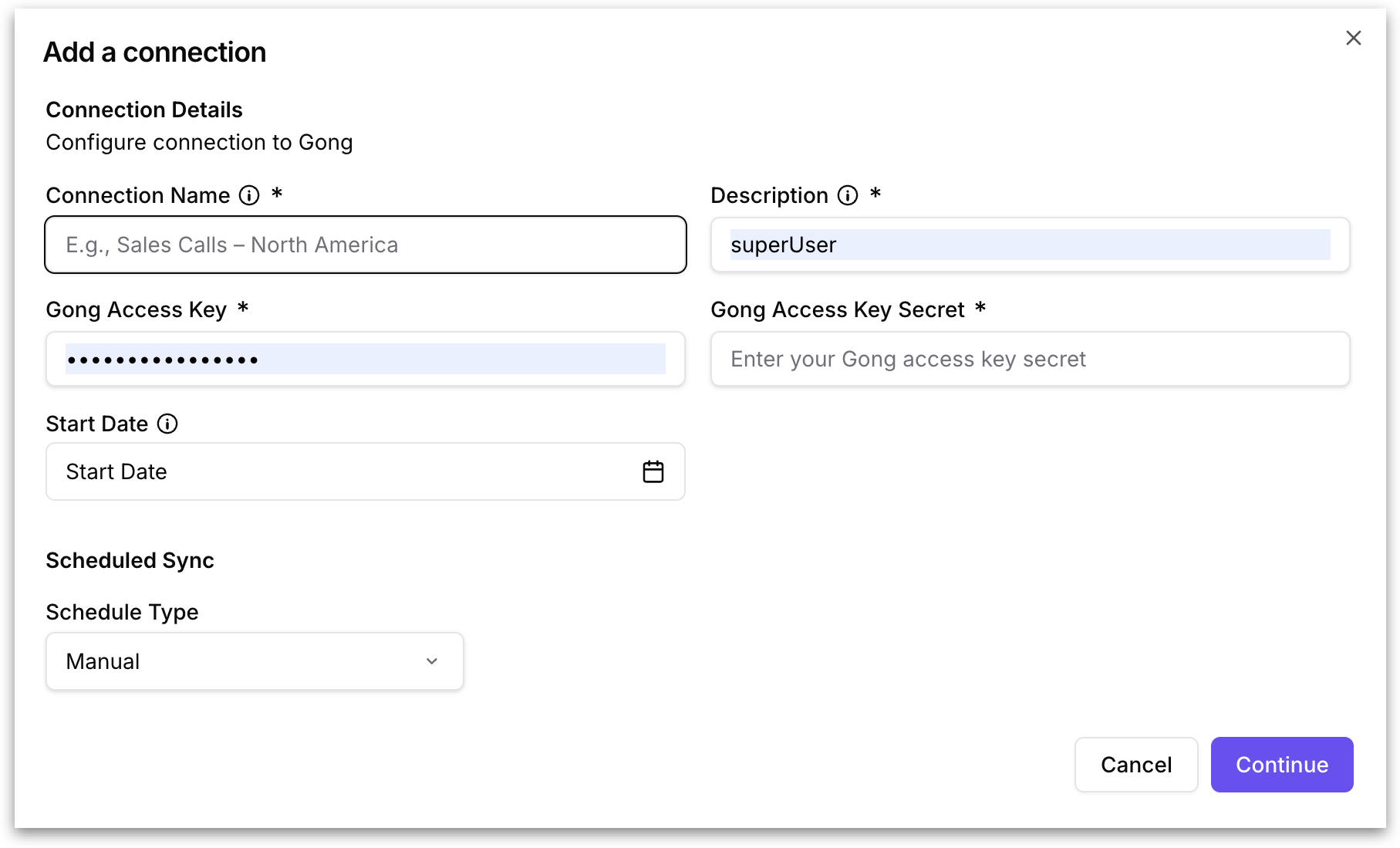
Clicking **Gong** opens the "Add a connection" dialog with the following fields.
**Connection Name:** A user-defined display name for this connection.
**Description:** A brief text description of what this connection is used for.
**Gong Access Key:** The API access key from your Gong account. You can generate this from the Gong admin settings under API integrations. This key identifies your Gong workspace and authorizes Tellius to pull call data. This field is masked after entry.
**Gong Access Key Secret:** The secret that corresponds to your Gong Access Key. Together, these two values authenticate Tellius with the Gong API. This field is masked after entry.
**Start Date:** An optional date picker that specifies the earliest date from which Tellius should pull Gong calls. Only calls recorded on or after this date will be synced. For example, setting the start date to January 1, 2026, would pull only calls from 2026 and later. If left empty, Tellius will sync all available calls from the Gong account.
**Scheduled Sync:** Configures how frequently Tellius automatically syncs new calls from Gong.
* **Manual** - Tellius will only sync when you explicitly trigger it using the **Synchronize** action from the three-dot menu on the connections table.
* **Schedule -** Set automatic recurring syncs so that new files added to Gong are automatically pulled into Tellius without manual intervention. A second dropdown appears: **Cron Schedule (UTC)**.
The **Cron Schedule** dropdown lets you define how frequently Tellius automatically syncs files from the connected source. All schedule times operate in UTC, so factor in your local timezone when choosing a schedule. The available options are:
* Hourly
* Every 6 hours
* Daily at midnight
* Daily at 2 AM
* Every 12 hours
{% hint style="info" %}
Choose a schedule frequency that matches how often new content arrives in your source. Over-frequent syncing on a source that rarely changes adds unnecessary processing load, while under-frequent syncing on an active source means Kaiya may not have access to the latest files.
{% endhint %}
Click **Continue** to proceed with creating the connection, or **Cancel** to discard the configuration.
---
# Agent Instructions
This documentation is published with GitBook. GitBook is the documentation platform designed so that both humans and AI agents can read, navigate, and reason over technical content effectively. Learn more at gitbook.com.
## Querying This Documentation
If you need additional information that is not directly available in this page, you can query the documentation by asking a question.
Perform an HTTP GET request on the following URL with the `ask` and `goal` query parameters:
```
GET https://help.tellius.com/kaiya/ask-across-your-documents-unstructured/how-to-connect-to-unstructured-data/connect-to-gong.md?ask=&goal=
```
`ask` is the immediate question: it should be specific, self-contained, and written in natural language.
`goal` is what the user is ultimately trying to achieve, the reason they need the answer. Sharing it helps GitBook give you a better, more relevant answer. A goal is most helpful when it describes the outcome the user wants rather than restating the question. For example, with `ask=how do I create an API token`, a goal like `automate deployments from our CI pipeline` lets GitBook tailor the answer to that use case.
The response will contain a direct answer to the question and relevant excerpts and sources from the documentation.
Use this mechanism when the answer is not explicitly present in the current page, you need clarification or additional context, or you want to retrieve related documentation sections.