> For the complete documentation index, see [llms.txt](https://help.tellius.com/llms.txt). Markdown versions of documentation pages are available by appending `.md` to page URLs; this page is available as [Markdown](https://help.tellius.com/kaiya/kaiya-skills.md).
# Kaiya Skills
With Skills, you teach Kaiya how to reason about *your* business. Kaiya answers from your domain by combining pre-built domain ontologies and investigation approaches with what you teach it, what your data means, what it has learned over time, and what it remembers about how you work. Skills are the layer you author and control directly: domain ontologies, investigation approaches, and business logic that shape how Kaiya generates SQL, builds charts, writes summaries, and frames analysis.
{% hint style="info" %}
Skills are applied automatically. You do not invoke a skill manually. Like **Memory** and **Learnings**, the relevant skills are applied naturally during a Kaiya conversation, and you can review which ones were applied under the response's **thought process** dropdown.
{% endhint %}
### How skills fit in: the Domain Reasoning Layer
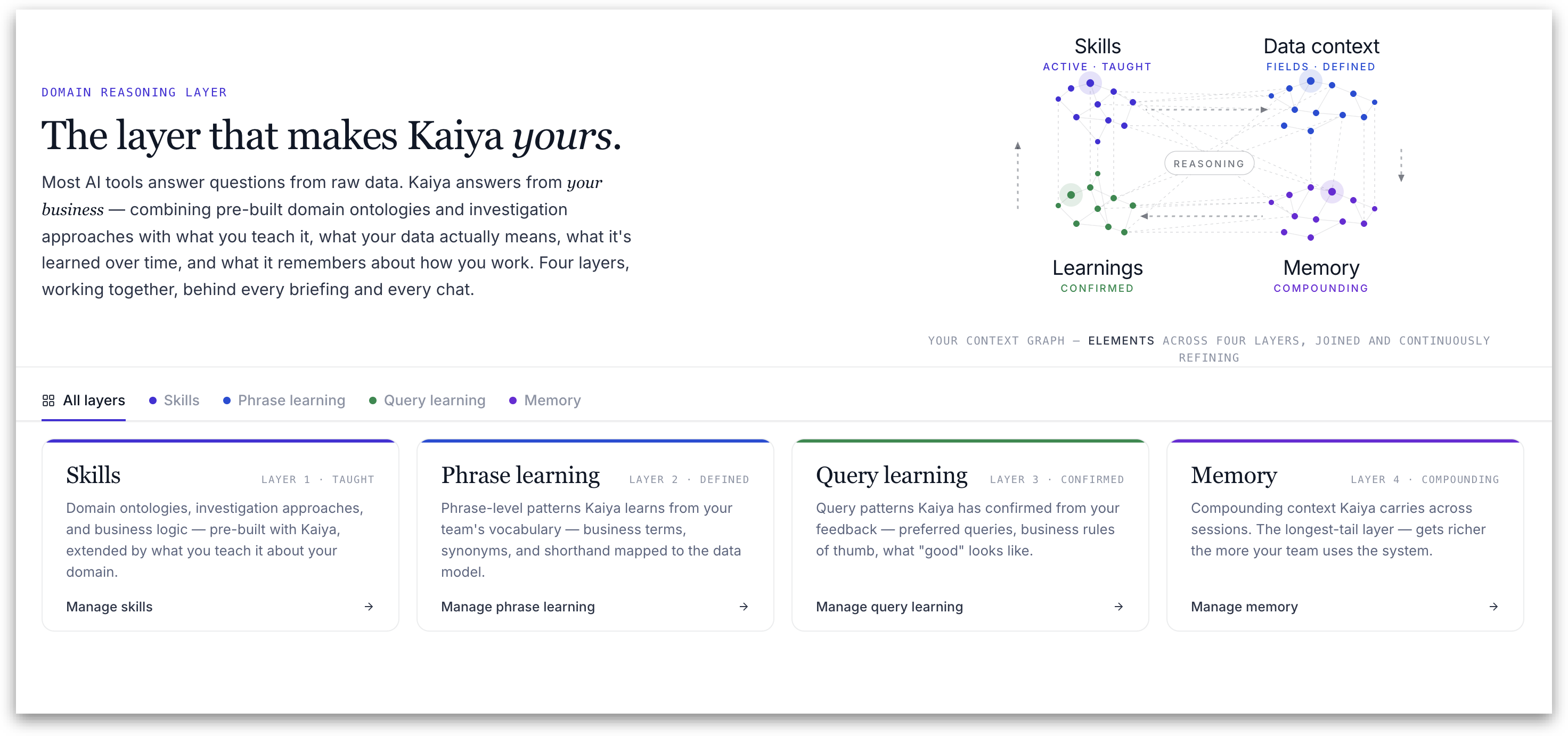
Skills are one part of Kaiya's **Domain Reasoning Layer.** The set of context layers that sit behind every briefing and every chat.
A tab bar lets you move between layers: **All layers**, **Skills**, **Phrase learning**, **Query learning**, and **Memory**. The **All Layers** view shows the full context graph with elements across all four layers, joined and continuously refining together. Below it, four cards summarize each layer, each with a **Manage** link:
* **Skills** *(Taught)* Domain ontologies, investigation approaches, and business logic; pre-built with Kaiya, extended by what you teach it about your domain.
* **Phrase learning** (*Defined)* Phrase-level patterns Kaiya learns from your team's vocabulary — business terms, synonyms, and shorthand mapped to the data model.
* **Query learning** (*Confirmed)* Query patterns Kaiya has confirmed from your feedback. This includes preferred queries, business rules of thumb, what "good" looks like.
* **Memory** (*Compounding)* Compounding context Kaiya carries across sessions. This is the longest-tail layer, which gets richer the more your team uses the system.
{% hint style="success" %}
When skills overlap, the precedence order is: **Custom skills > Domain skills > Behavioural Layer > Implementation Layer.** User-level customizations always win over broader defaults; the Implementation Layer (which defines core tool calls and platform functionality) sits at the foundation and is not overridden through user or domain skills.
{% endhint %}
### **Inside the Skills layer: four context layers**
When you open the **Skills** tab, the left **Context Layers** panel shows the four layers that feed Kaiya's reasoning for a request, from the foundational platform instructions through to your tenant's own skills:
* **System Prompt.** The base instructions Kaiya uses when planning and summarizing. It is read-only reference, and it is split into two sub-layers: the **Implementation Layer** (the core tool calls and platform functionality that make Kaiya operate correctly across the platform) and the **Behavioural Layer** (Kaiya's default behaviour, which super users can tune when platform-wide behaviour needs adjusting).
* **Business View Context.** The schema, grain, and vocabulary passed to Kaiya with the active Business View. It is set by the workspace and is read-only here.
* **Domain Skill.** Industry-specific rules and defaults, curated by Tellius and shipped with the platform (described below).
* **Custom Skill.** Your tenant's own skills, authored from the specific requirements of your deployment (described below).
### **Domain Skills vs Custom Skills**
The difference is who owns them, who can edit them, and how they are structured.
**Domain Skills** are curated by Tellius and ship with the platform. They hold industry-specific rules and sensible defaults for a vertical. A Domain Skill is organized into one or more **sections**, where each section has its own description and detail and teaches Kaiya one distinct thing. For example, one section for how to run a particular analysis and another for how to summarize the result. Domain Skills are editable by **super users only**; every other role sees them as read-only.
**Custom Skills** are created by your own organization, based on the specific requirements of your deployment (your vocabulary, preferences, and business rules). A Custom Skill is authored directly in the tenant and, once published, applies to **every user in that tenant** rather than to a single person. A Custom Skill carries a description, a detail body, and one or more routing labels (described below).
{% hint style="warning" %}
A skill's layer (Domain or Custom) is chosen when it is created and cannot be changed afterward. Each skill also has a **Status** control, so it can be enabled or disabled without being deleted.
{% endhint %}
### **Anatomy of a Custom Skill**
* **Skill name.** A name for the skill.
* **Description.** A short, human-readable summary of when and why the skill applies. The description is what routes the skill to the relevant Kaiya engine paths.
* **Detail.** The skill definition itself — the instructions the engine executes. Accepts markdown.
* **Labels.** One or more technical routing tags that determine which Kaiya engine path the skill applies to.
* **Status.** A toggle to enable or disable the skill without deleting it.
### **What each Label controls:**
| Label | What it shapes |
| --------------------- | ------------------------------------------------------------------------------------------------------------------- |
| Default | General behaviour where no more specific routing applies. |
| SQL | SQL generation for standard textual queries. Also the routing label for Deep Insights analytical framing. |
| SQL Editor | Semantic-cache queries — the fast path that returns within 3–5 seconds once the original query has been configured. |
| SQL Reflection | Reflection logic applied to textual SQL queries. |
| SQL Editor Reflection | Reflection logic applied to semantic-cache queries. |
| Highcharts | Chart selection and formatting via the Highcharts rendering library. |
| Chart Config | Legacy chart configuration (being phased out). |
| Narration | How chart titles, summaries, and result narratives are written. |
### **How skills are layered and prioritized**
A single request can match more than one layer at once. The layers resolve from the foundational platform instructions through to your tenant's own skills:
**What each Label controls:**
| **Layer** | **What it does** |
| ---------------------------------------- | ------------------------------------------------------------------------------------------------------------------------------------- |
| Layer 1a: System Prompt - Implementation | Defines core tool calls and platform functionality. The foundational layer that ensures Kaiya operates correctly across the platform. |
| Layer 1b: System Prompt - Behavioural | Defines default Kaiya behavior across the platform. Can be tuned by super users when platform-wide behavior needs adjustment. |
| Layer 2: Domain skills | Encodes vertical or Business-View-specific behavior. Scoped to a Business View. |
| Layer 3: User skills | Per-user customizations. Overrides domain and behavioural layers at runtime when both apply. |
When more than one applies, a loaded **Custom Skill overrides the Behavioural Layer**, and a Custom Skill takes precedence over a Domain Skill where both apply. The Implementation Layer sits at the foundation and is never overridden by a skill.
### **Who can manage skills**
Skill management is role-based. **Super users** see and manage all four context layers, including Domain Skills. **Admin users** can manage Custom Skills. **Power users** and other roles can see the skills applied to their conversations but cannot add or edit them.
---
# Agent Instructions
This documentation is published with GitBook. GitBook is the documentation platform designed so that both humans and AI agents can read, navigate, and reason over technical content effectively. Learn more at gitbook.com.
## Querying This Documentation
If you need additional information that is not directly available in this page, you can query the documentation by asking a question.
Perform an HTTP GET request on the following URL with the `ask` and `goal` query parameters:
```
GET https://help.tellius.com/kaiya/kaiya-skills.md?ask=&goal=
```
`ask` is the immediate question: it should be specific, self-contained, and written in natural language.
`goal` is what the user is ultimately trying to achieve, the reason they need the answer. Sharing it helps GitBook give you a better, more relevant answer. A goal is most helpful when it describes the outcome the user wants rather than restating the question. For example, with `ask=how do I create an API token`, a goal like `automate deployments from our CI pipeline` lets GitBook tailor the answer to that use case.
The response will contain a direct answer to the question and relevant excerpts and sources from the documentation.
Use this mechanism when the answer is not explicitly present in the current page, you need clarification or additional context, or you want to retrieve related documentation sections.