> For the complete documentation index, see [llms.txt](https://help.tellius.com/llms.txt). Markdown versions of documentation pages are available by appending `.md` to page URLs; this page is available as [Markdown](https://help.tellius.com/kaiya/kaiyas-persistent-memory.md).
# Kaiya's persistent memory
Learn how Kaiya Persistent Memory personalizes AI-driven analytics with reusable context, semantic understanding, and smarter workflows.
When you're analysing data, you often establish context that is specific to your organization, your data, or your analytical preferences. Which metric to use when someone says "sales." How to define "longer delivery times." Whether a particular query should route to a direct SQL answer or a Deep Insight workflow. Without persistent memory, this context is lost at the end of every conversation, and you re-explain the same things each time.
Kaiya has a persistent memory layer that survives across conversations. You define a business rule, a metric preference, an entity definition, or a routing instruction once, and Kaiya applies it automatically in every future session within the scope you choose.
Memories are managed through the **Memory Management** tab, located within the **Kaiya → Manage Learnings** page. They can be created manually, extracted from uploaded documents, or saved automatically from conversational interactions such as clarifications and workflow corrections.
### Accessing Memory Management
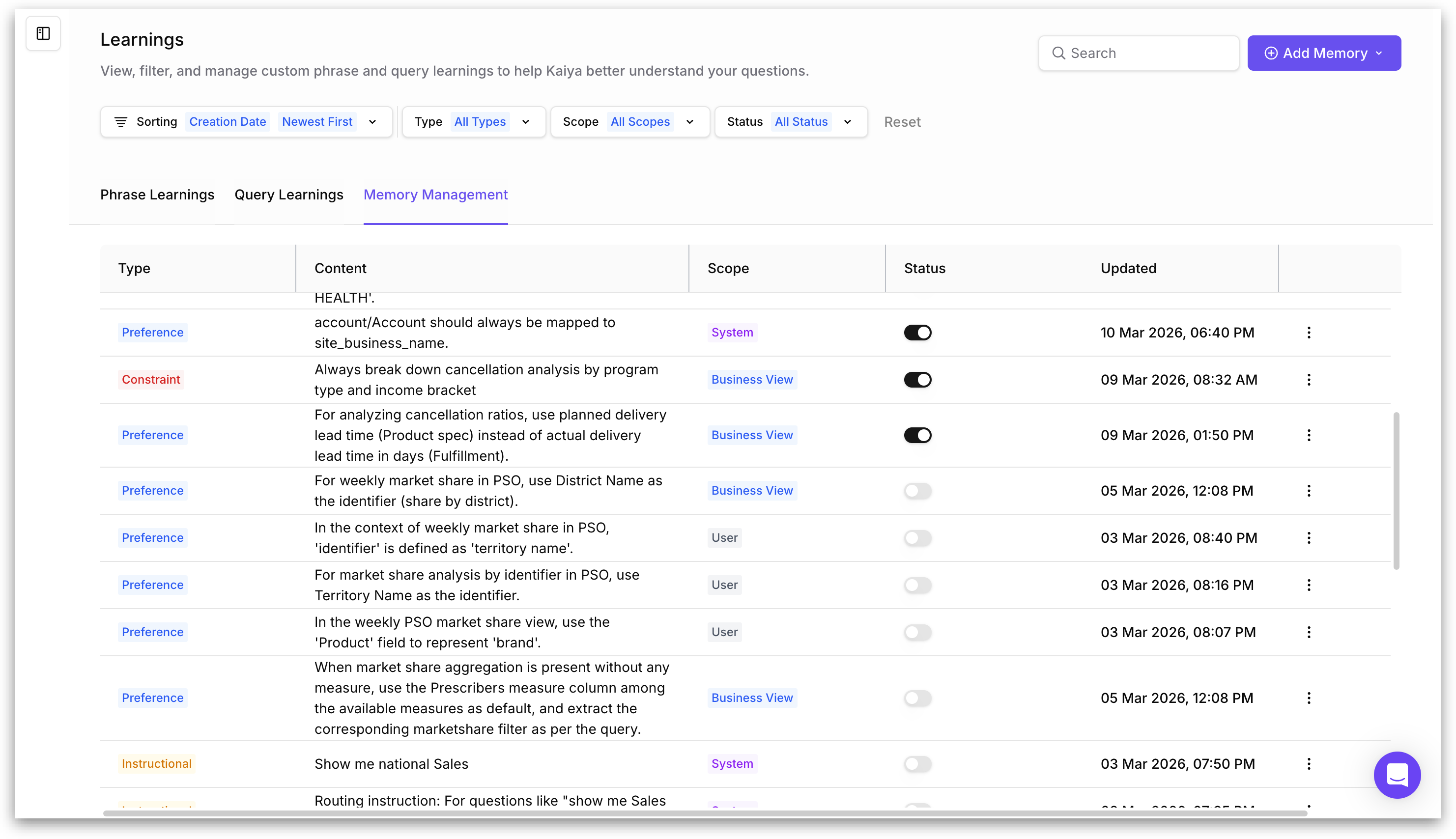
The Learnings page has three tabs: **Phrase Learnings, Query Learnings**, and **Memory Management**. Click the **Memory Management** tab to view and manage all stored memories.
The Memory Management tab displays all memories in a table with the following columns:
* **Type**: The classification of the memory (for example, **Preference, Constraint, Instructional, Fact, Ontological, Procedural**, or **Insight**). Each type is displayed as a colored label.
* **Content**: This is the actual instruction, definition, or preference that Kaiya will use.
* **Scope**: Where the memory applies. Displayed as a colored label: System (global across all users), Business View (tied to a specific BV), or User (applies only to the individual who created it).
* **Status**: A toggle switch indicating whether the memory is active. When toggled on, the memory is live and Kaiya uses it. When toggled off, the memory is stored but inactive.
* **Updated**: The date and time the memory was last modified.
The table includes filtering and sorting controls at the top:
* **Sorting**: Sort by Creation Date (Newest First or Oldest First).
* **Type filter:** Filter by specific memory types (All Types, or select individual types).
* **Scope filter:** Filter by scope (All Scopes, System, Business View, or User).
* **Status filter:** Filter by active/inactive status (All Status, Active, or Inactive).
* **Search:** A search bar to find memories by keyword.
* **Reset:** Clears all applied filters.
Each memory row has a three-dot menu on the right that opens options to edit or delete the memory.
### Memory Types
Each memory is classified into a type that tells Kaiya how to use it. The type determines whether the memory is treated as a hard rule, a soft preference, a factual definition, or a routing instruction. The following types are available:
**Preference:**
A default behavior that Kaiya applies automatically but that can be overridden by the user in a specific conversation. Preferences are the most common memory type and are created automatically when you respond to clarification questions.
For example, "For analyzing cancellation ratios, use planned delivery lead time (Product spec) instead of actual delivery lead time in days (Fulfillment)."
**Constraint:**
A rule that Kaiya must always follow without exception. Constraints are stronger than preferences and cannot be overridden conversationally. Use constraints for business logic that should never vary.
For example, "Always break down cancellation analysis by program type and income bracket."
**Fact:**
A factual statement about your data or business that Kaiya should treat as ground truth. Facts are used to resolve ambiguity when Kaiya encounters terms or entities that could have multiple interpretations.
For example, "In the EV dataset, Model Y refers to the Tesla Model Y Long Range variant only."
**Instructional:**
A routing or workflow instruction that tells Kaiya how to handle specific types of queries. Instructional memories are created automatically when you approve or correct Kaiya's workflow routing decisions (for example, when Kaiya proposes a Deep Insight but you redirect it to a direct SQL query).
For example, "For questions like 'show me national Sales', route to text-to-SQL, not Deep Insight."
**Ontological:**
An entity definition or synonym mapping. Ontological memories prevent Kaiya from applying incorrect default definitions to business terms that have specific meanings in your organization.
For example, "NBRx market share means new-to-brand prescriptions as a share of total prescriptions within the therapeutic area, not overall portfolio."
**Procedural:**
A step-by-step instruction for how Kaiya should approach a specific type of analysis or task.
For example, "When calculating market share by territory, first filter to the active formulary, then aggregate by territory name, not territory ID."
**Insight:**
A saved analytical observation from a previous conversation. Insight memories are available for Kaiya to reference or cite in future conversations when the topic is relevant.
For example, "Q3 territory underperformance was driven primarily by HCPs in Decile 4-6 who reduced call frequency after the formulary change."
### Memory Scope
Every memory has a scope that determines who it affects and what data it applies to. Scope is set when a memory is created and can be changed later by editing the memory.
| **Scope** | **Who It Affects** | **When to Use** |
| ------------- | --------------------------------------------------------------------------------------------------------------------------------------------------- | --------------------------------------------------------------------------------------------------------------------------------------------------------------------- |
| User | Only the individual user who created the memory. Other users on the same Tellius instance are not affected. | Personal analytical preferences. For example, a specific user who always wants to see revenue in EUR rather than USD. |
| Business View | All users who query the specified Business View. The memory is tied to a specific BV selected from a dropdown when the memory is created or edited. | Business logic that is specific to a dataset. For example, a definition of "market share" that is calculated differently in the Commercial BV versus the Clinical BV. |
| System | All users across the entire Tellius instance, regardless of which Business View they are querying. System-scope memories are global. | Organization-wide rules and definitions. For example, a company-wide standard that "revenue" always means net revenue after returns. |
{% hint style="info" %}
When a memory is scoped to Business View, a BV selector dropdown appears in the memory creation or editing dialog, allowing you to choose which BV the memory applies to. Memories scoped to a BV are only active when Kaiya is working with that specific Business View.
{% endhint %}
{% hint style="warning" %}
When memories at different scopes conflict, more specific scopes take precedence. A User-scope memory overrides a System-scope memory for that individual. A Business View-scope memory overrides a System-scope memory when that BV is active.
{% endhint %}
### How Kaiya uses memories at query time
Memories are consumed at two points in Kaiya's query processing pipeline:
#### Query routing
When a question is submitted, Kaiya determines what type of workflow to use. Instructional-type memories are checked at this stage. If a matching Instructional memory exists, Kaiya applies it automatically instead of using its default routing logic.
#### Query execution and context resolution
During the analysis planning phase, Kaiya retrieves all active memories that are relevant to the current query and BV context. Preference and Fact memories are applied here.
This means that over time, as you build up a library of preferences and facts, Kaiya asks fewer clarification questions because the ambiguities that would normally trigger them have already been resolved by stored memories.
### Frequently Asked Questions
#### Can I deactivate a memory without deleting it?
Yes. Toggle the **Status** of the required memory. The memory is retained in **Memory Management** but is no longer used by Kaiya. You can reactivate it at any time by toggling it back on.
#### Can I see which memories Kaiya used for a specific query?
Memories that influenced a query's execution are reflected in Kaiya's **Thought Process** and step-by-step execution log. If a memory was used to skip a clarification or route a query, the relevant step in the execution log references the stored preference.
#### Do memories from one Business View affect queries on other Business Views?
Only if the memory is scoped to **System** (global) or **User**. Memories scoped to a specific Business View are only active when Kaiya is working with that BV. A preference defined for the Commercial BV does not apply when you query the Clinical BV.
#### Can I use memories to teach Kaiya custom terminology?
Yes. This is exactly what Ontological-type memories are for. If your organization uses a term that differs from the column name in the BV (for example, "market" means something specific in your context), you can create an **Ontological** memory defining it. Kaiya uses this definition to resolve the term correctly in future queries.
---
# Agent Instructions
This documentation is published with GitBook. GitBook is the documentation platform designed so that both humans and AI agents can read, navigate, and reason over technical content effectively. Learn more at gitbook.com.
## Querying This Documentation
If you need additional information that is not directly available in this page, you can query the documentation by asking a question.
Perform an HTTP GET request on the following URL with the `ask` and `goal` query parameters:
```
GET https://help.tellius.com/kaiya/kaiyas-persistent-memory.md?ask=&goal=
```
`ask` is the immediate question: it should be specific, self-contained, and written in natural language.
`goal` is what the user is ultimately trying to achieve, the reason they need the answer. Sharing it helps GitBook give you a better, more relevant answer. A goal is most helpful when it describes the outcome the user wants rather than restating the question. For example, with `ask=how do I create an API token`, a goal like `automate deployments from our CI pipeline` lets GitBook tailor the answer to that use case.
The response will contain a direct answer to the question and relevant excerpts and sources from the documentation.
Use this mechanism when the answer is not explicitly present in the current page, you need clarification or additional context, or you want to retrieve related documentation sections.