> For the complete documentation index, see [llms.txt](https://help.tellius.com/llms.txt). Markdown versions of documentation pages are available by appending `.md` to page URLs; this page is available as [Markdown](https://help.tellius.com/settings/embedding.md).
# Embedding
Under **Settings → Modules → Embedding**, you can place parts of Tellius inside your own web applications. Each module that supports embedding has its own page under this section, and each page produces a URL you paste into an iframe or link to from your application.
The Embedding section contains six pages: **Search**, **Assistant**, **Dashboard**, **Discover**, **Feed**, and **Kaiya**.
#### How embedding works
* Every embed page hands you a URL rather than a code snippet.
* The URL carries a `utm_source` identifier that ties the embedded view back to your workspace.
* Drop it into an iframe, or open it directly, and the embedded module renders in place.
* **Dashboard** and **Discover** generate a URL per artifact, since you're embedding one specific Vizpad or Insight rather than a whole module. The other four embed the module as a whole.
### Common embed settings
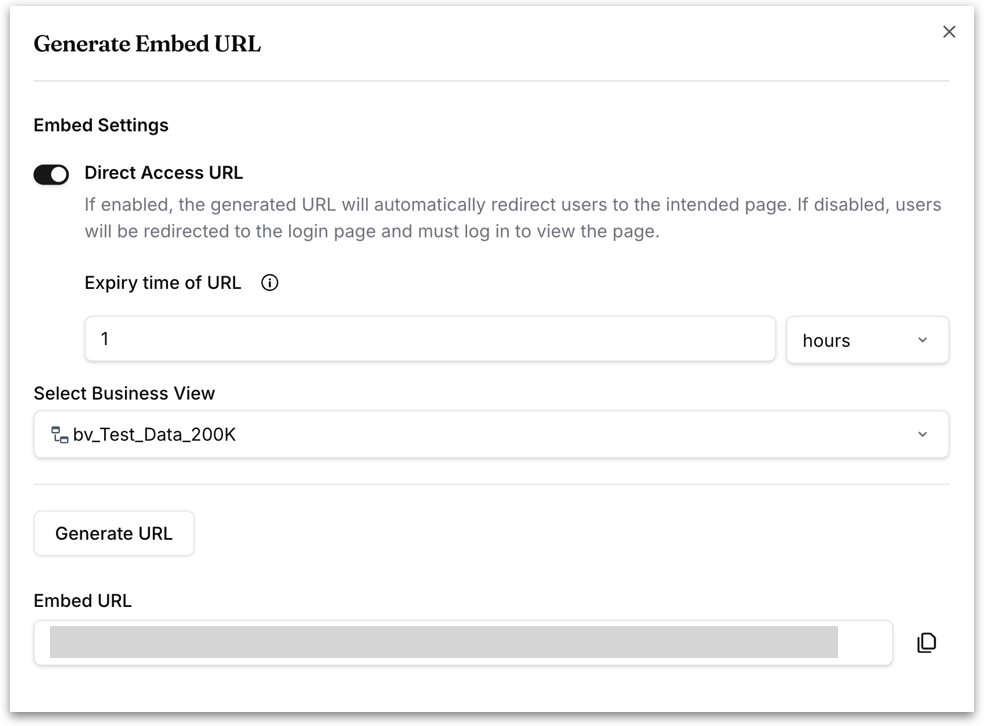
Most embed pages open a **Generate Embed URL** dialog with the same core option.
**Direct Access URL:** Controls whether the embedded page requires a login.
* If enabled, the generated URL takes users straight to the intended page.
* If disabled, users are sent to the login page first and must sign in before the page loads.
Turning this on reveals one additional field:
**Expiry time of URL:** Sets how long the generated URL stays valid. Enter a number and choose a unit: **hours**, **days**, or **months**. The default is 1 hour.
Because a **Direct Access URL** bypasses the login screen, anyone holding the link can open the embedded page. The expiry time is what limits that exposure; a short window means a leaked or forwarded link stops working quickly. Set it to the shortest period that covers your use case rather than accepting a long default.
{% hint style="info" %}
Leave this off when embedding inside an application where users should still authenticate with Tellius. Turn it on for contexts where you've already established who the user is and a second login would be redundant.
{% endhint %}
Click **Generate URL** to produce the link. The URL appears in an **Embed URL** field below the button with a copy icon beside it. Just copy it and use it in your own application.
### **Search**
Embeds the Search module. The **Generate Embed URL** dialog offers **Direct Access URL** plus one additional option:
**Select Business View:** Pins the embedded Search to a specific Business View. Choose **None** to leave it unset, in which case users pick their own Business View inside the embed. Selecting one scopes the embedded Search to that data, which is what you want when the embed sits on a page dedicated to a particular subject area.
### **Assistant**
Embeds the Tellius Digital Assistant.
{% hint style="warning" %}
This page embeds the **Tellius Digital Assistant**, which is a separate feature from Kaiya Conversational AI. To embed Kaiya, use the **Kaiya** page instead.
{% endhint %}
This page offers two separate embed URLs, each with its own **Generate Embed URL** button:
* **Embed URL:** embeds the Assistant as a full page.
* **Embed URL for conversation panel:** embeds just the conversation panel, suitable for placing the Assistant in a sidebar or drawer within your own application rather than giving it a whole page.
Both dialogs offer **Direct Access URL** only. There is no Business View selection, since the Assistant is not tied to a Business View.
### **Dashboard**
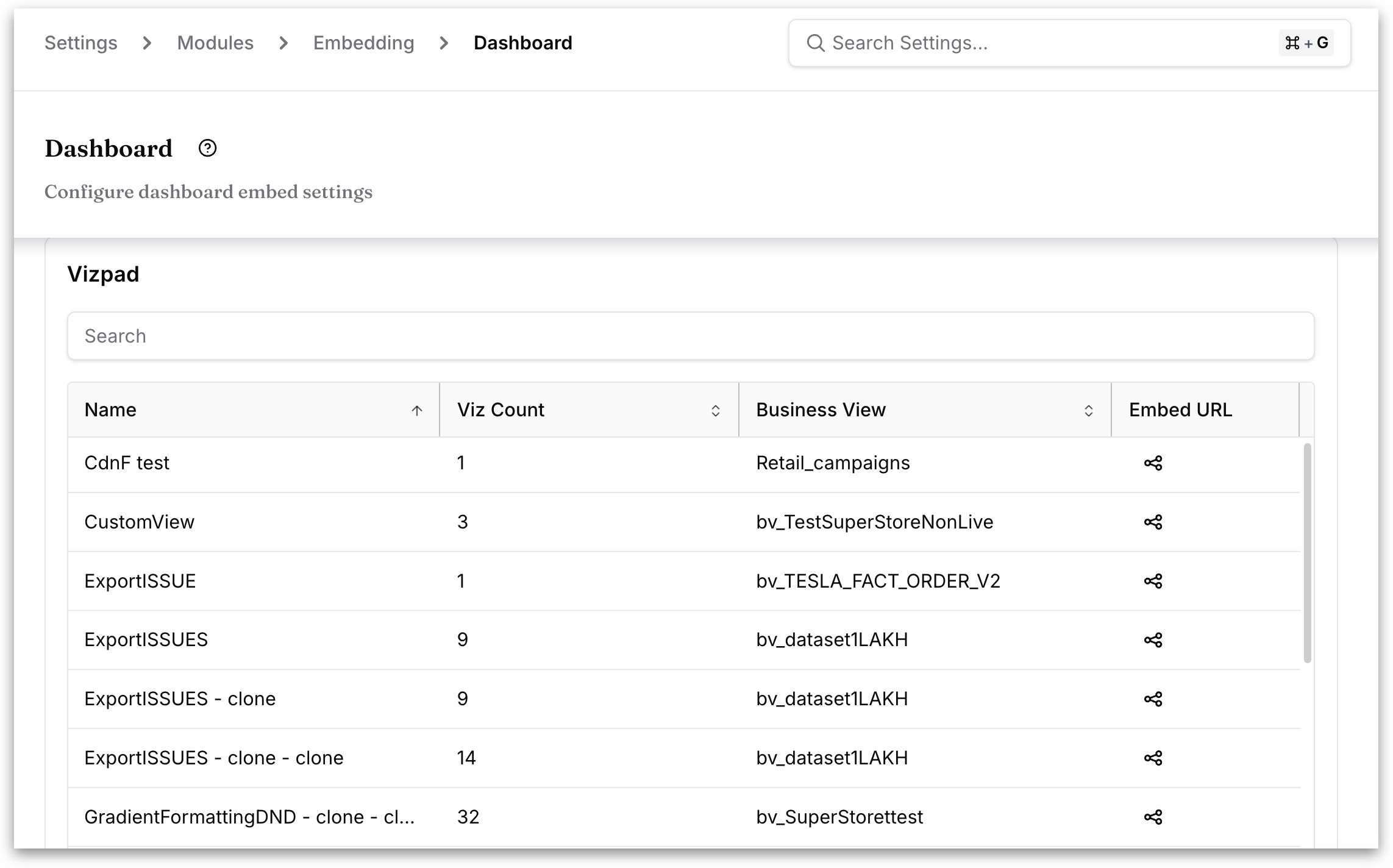
Embeds an individual Vizpad. Unlike the module-level embed pages, this one shows a table of every Vizpad in your workspace, with these columns:
| Column | What it shows |
| ----------------- | --------------------------------------------------- |
| **Name** | The Vizpad's name. |
| **Viz Count** | How many visualizations it contains. |
| **Business View** | The Business View it is built on. |
| **Embed URL** | An action to produce the embed URL for that Vizpad. |
Use the **Search** box above the table to find a Vizpad by name, or sort by any column header.
Generate the URL from the **Embed URL** column on the row for the Vizpad you want. The Generate Embed URL dialog offers more options than the other embed pages:
**Direct Access URL** and **Expiry time of URL:** as described under **Common embed** settings.
**Access to global filters:** Sets what the embedded Vizpad's viewers can do with global filters. Global filters apply across every tab of a Vizpad, so this decides whether an embedded viewer can only see the filters that were applied or can change them.
* **View:** viewers see the global filters and the values applied, but cannot change them.
* **Edit:** viewers can change the global filter values, re-filtering the embedded Vizpad themselves.
* **Hide:** the global filters are not shown at all. Any values already applied still filter the data; viewers simply can't see or reach the controls.
**Access Type:** Sets the overall permissions carried by the generated URL, controlling whether viewers can only read the Vizpad or interact with it more fully.
* **Read:** viewers can look at the Vizpad but not change it.
* **Write:** viewers can make changes through the embedded view.
**Enable Row Level Policy:** When on, Row-Level Policy restricts data visibility so users only see the rows they're authorized to access.
{% hint style="warning" %}
A policy must already exist before you enable this toggle. Turning it on without a policy defined, or leaving it off when a policy is defined, produces an invalid configuration. Define the **Row Level Policy** first, then generate the embed URL.
{% endhint %}
### **Discover**
Embeds an individual Insight. Structurally identical to Dashboard, but listing Insights instead of Vizpads.
| Column | What it shows |
| ----------------- | ---------------------------------------------------- |
| **Name** | The Insight's name. |
| **Type** | The kind of Insight, for example a drivers Insight. |
| **Business View** | The Business View it was generated from. |
| **Embed URL** | An action to produce the embed URL for that Insight. |
Search, sorting, and pagination work the same way as on the Dashboard page. Workspaces accumulate Insights quickly, so expect this table to run to many pages — use the search box rather than paging through.
### **Feed**
Embeds the Feed module. A single **Embed URL** row with a **Generate Embed URL** button, offering **Direct Access URL** only.
### **Kaiya**
Embeds Kaiya. This page has the most options of the six.
The Generate Embed URL dialog offers three toggles:
**Direct Access URL** as described above.
**Only Kaiya Conversational AI:** When enabled, the URL embeds just the Kaiya conversational interface. Users can ask questions and get insights without reaching the rest of the Tellius platform. Use this when you want a question-and-answer surface inside your application without exposing Tellius navigation.
**Enable Row Level Policy:** When on, Row-Level Policy restricts data visibility so users only see rows they're authorized to access.
{% hint style="warning" %}
A policy must already exist before you enable this toggle. Turning it on without a policy defined, or leaving it off when a policy is defined, produces an invalid configuration. Define the Row Level Policy first, then generate the embed URL.
{% endhint %}
---
# Agent Instructions
This documentation is published with GitBook. GitBook is the documentation platform designed so that both humans and AI agents can read, navigate, and reason over technical content effectively. Learn more at gitbook.com.
## Querying This Documentation
If you need additional information that is not directly available in this page, you can query the documentation by asking a question.
Perform an HTTP GET request on the following URL with the `ask` and `goal` query parameters:
```
GET https://help.tellius.com/settings/embedding.md?ask=&goal=
```
`ask` is the immediate question: it should be specific, self-contained, and written in natural language.
`goal` is what the user is ultimately trying to achieve, the reason they need the answer. Sharing it helps GitBook give you a better, more relevant answer. A goal is most helpful when it describes the outcome the user wants rather than restating the question. For example, with `ask=how do I create an API token`, a goal like `automate deployments from our CI pipeline` lets GitBook tailor the answer to that use case.
The response will contain a direct answer to the question and relevant excerpts and sources from the documentation.
Use this mechanism when the answer is not explicitly present in the current page, you need clarification or additional context, or you want to retrieve related documentation sections.