> For the complete documentation index, see [llms.txt](https://help.tellius.com/llms.txt). Markdown versions of documentation pages are available by appending `.md` to page URLs; this page is available as [Markdown](https://help.tellius.com/tellius-6.1/settings/my-profile.md).
# My Profile
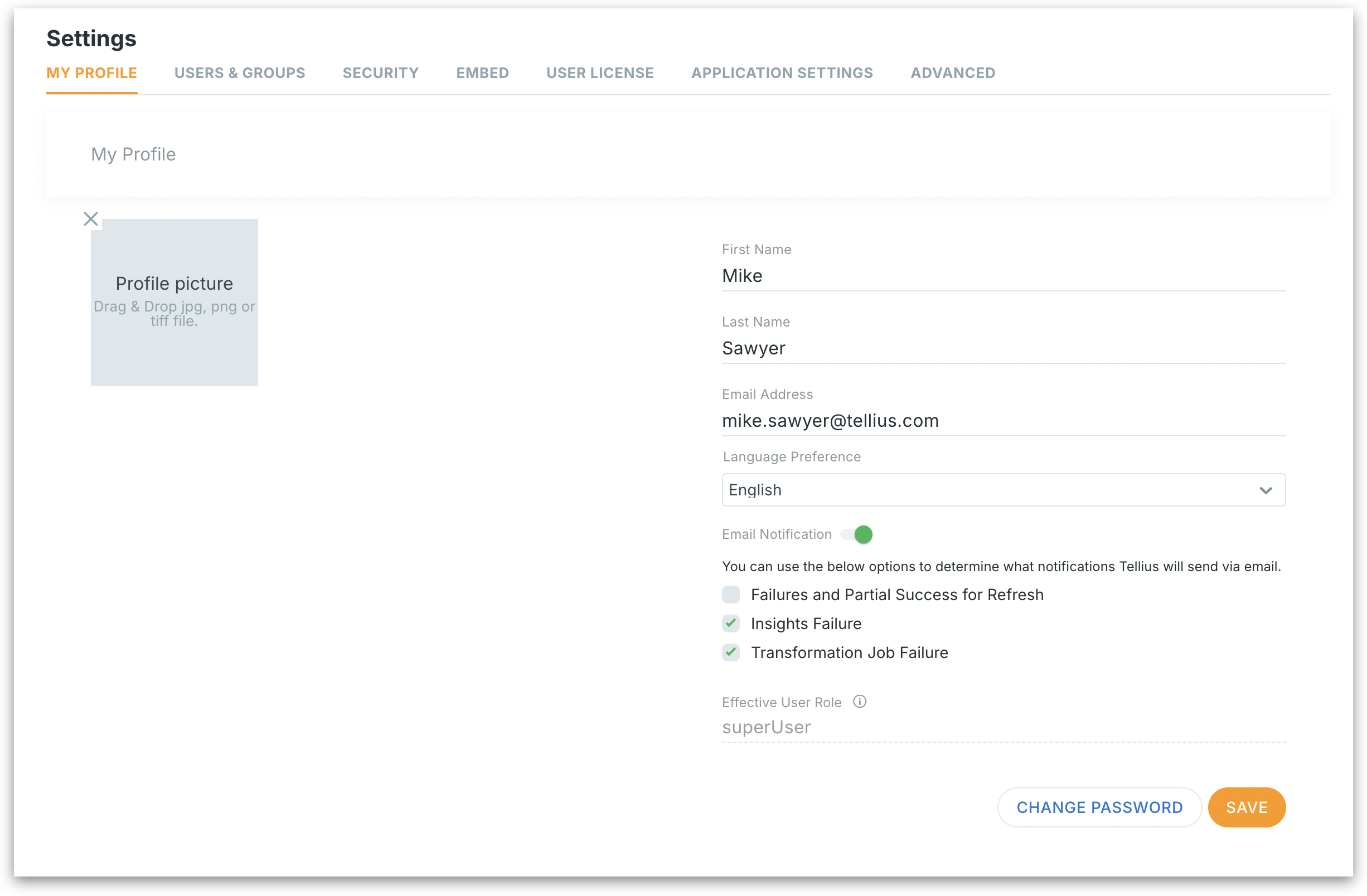
Manage your profile details, language settings, email alerts, and password in Tellius to personalize your experience and stay updated on system events and refresh issues.
Use **My Profile** to manage the information that identifies you in the system, fine‑tune what email alerts you receive, and keep your password up to date.
Settings > My Profile
### **Profile picture**
Click to upload or change your personal avatar.
### First name
Provide the first name. Stored in the user directory and displayed across the UI (e.g., “*Created by Michael*”).
### Last name
Provide the last name.
### Email address
Primary user identifier for sign‑in, password‑reset, and system notifications.
### Language preference
A dropdown that sets your personal UI locale—menus, date formats, and number separators update instantly after you choose a new language.
### Email notification
Enables/disables all outbound automated emails to this account. When off, Tellius will still log the events but will not send you mail.
**Failures and Partial Success for Refresh:** Sends emails when a scheduled dataset refresh fails outright or completes with row‑level errors (partial success). Good for data‑owner roles.
**Insights Failure:** Alerts you if an automated insight generation job (e.g., anomaly detection) cannot finish.
**Transformation Job Failure:** Notifies you when an ETL/ELT transformation script errors out.
### Effective user role
Read‑only field showing the role that actually governs your permissions.
### Change password
Extends the page with fields for new password.
After editing the required details, click on **Save** to apply changes.
---
# Agent Instructions
This documentation is published with GitBook. GitBook is the documentation platform designed so that both humans and AI agents can read, navigate, and reason over technical content effectively. Learn more at gitbook.com.
## Querying This Documentation
If you need additional information that is not directly available in this page, you can query the documentation by asking a question.
Perform an HTTP GET request on the following URL with the `ask` and `goal` query parameters:
```
GET https://help.tellius.com/tellius-6.1/settings/my-profile.md?ask=&goal=
```
`ask` is the immediate question: it should be specific, self-contained, and written in natural language.
`goal` is what the user is ultimately trying to achieve, the reason they need the answer. Sharing it helps GitBook give you a better, more relevant answer. A goal is most helpful when it describes the outcome the user wants rather than restating the question. For example, with `ask=how do I create an API token`, a goal like `automate deployments from our CI pipeline` lets GitBook tailor the answer to that use case.
The response will contain a direct answer to the question and relevant excerpts and sources from the documentation.
Use this mechanism when the answer is not explicitly present in the current page, you need clarification or additional context, or you want to retrieve related documentation sections.