> For the complete documentation index, see [llms.txt](https://help.tellius.com/llms.txt). Markdown versions of documentation pages are available by appending `.md` to page URLs; this page is available as [Markdown](https://help.tellius.com/tellius-6.2/getting-started/universal-search.md).
# Universal Search
Find any resource instantly with Tellius Universal Search. Use Ctrl+K to access fast, intelligent, keyboard-driven search across all artifacts and insights.
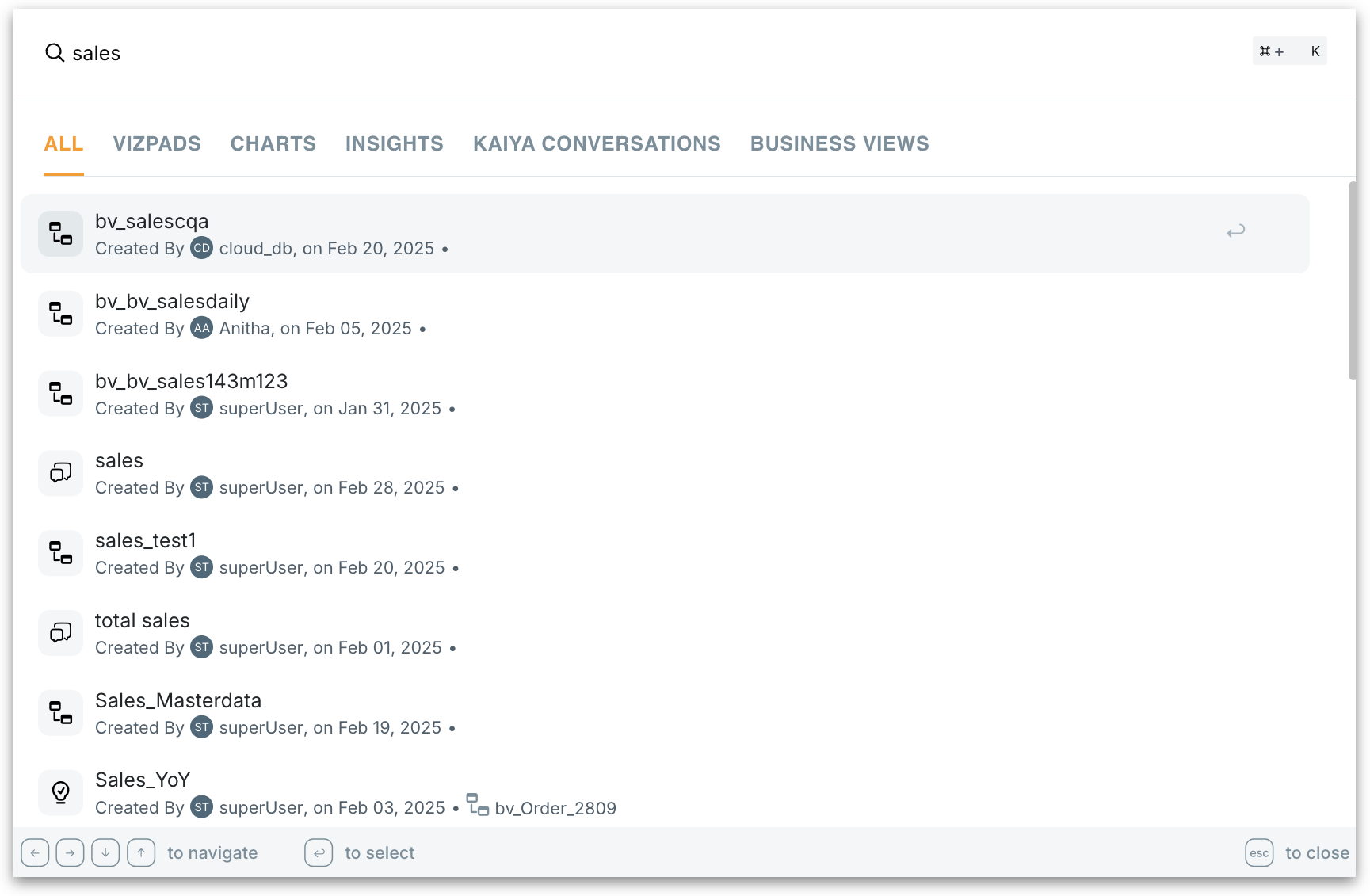
The Universal Search feature in Tellius 5.4 helps users locate and interact with resources across the platform. It is designed for fast, centralized, keyboard-driven access—letting you instantly find artifacts across Tellius with just a few keystrokes.
### How to access Universal Search?
You can invoke Universal Search from anywhere in Tellius.
1. Press **Ctrl + K** (Windows/Linux) or **Cmd + K** (Mac). Once triggered, a search bar will appear, ready for input.
2. Start typing a keyword related to the artifact name, metric, or topic.
3. As you type, search results will auto-populate, grouped by artifact type (e.g., Vizpads, Insights).
4. Use the arrow keys to navigate through the results.
5. Press **Enter** to open the selected artifact directly.
{% hint style="success" %}
* **Autocomplete suggestions:** Tellius predicts what you're searching for based on frequently accessed items and recent queries. Frequent queries are cached for faster retrieval.
* **Fuzzy search:** Supports minor spelling errors and partial matches. For example, typing "sals report" will still suggest "Sales Report".
{% endhint %}
### What can you search?
Universal Search indexes metadata across various artifact types. Below are the supported artifacts:
* Vizpads
* Insights
* Business Views
* Kaiya Conversations
* Predictive Models
{% hint style="danger" %}
You will only see artifacts that your user role and permissions allow. Restricted or sensitive artifacts will not appear in your search results.
{% endhint %}
### Keyboard Shortcuts
| **Function** | **Shortcut** |
| ---------------- | ------------------ |
| Open Search Bar | Ctrl + K / Cmd + K |
| Navigate Results | ↑ / ↓ |
| Select & Open | Enter |
| Close Search | Esc |
{% hint style="warning" %}
If the intended artifact doesn't appear, please review the search terms or contact admin for indexing status.
{% endhint %}
---
# Agent Instructions
This documentation is published with GitBook. GitBook is the documentation platform designed so that both humans and AI agents can read, navigate, and reason over technical content effectively. Learn more at gitbook.com.
## Querying This Documentation
If you need additional information that is not directly available in this page, you can query the documentation by asking a question.
Perform an HTTP GET request on the following URL with the `ask` and `goal` query parameters:
```
GET https://help.tellius.com/tellius-6.2/getting-started/universal-search.md?ask=&goal=
```
`ask` is the immediate question: it should be specific, self-contained, and written in natural language.
`goal` is what the user is ultimately trying to achieve, the reason they need the answer. Sharing it helps GitBook give you a better, more relevant answer. A goal is most helpful when it describes the outcome the user wants rather than restating the question. For example, with `ask=how do I create an API token`, a goal like `automate deployments from our CI pipeline` lets GitBook tailor the answer to that use case.
The response will contain a direct answer to the question and relevant excerpts and sources from the documentation.
Use this mechanism when the answer is not explicitly present in the current page, you need clarification or additional context, or you want to retrieve related documentation sections.