> For the complete documentation index, see [llms.txt](https://help.tellius.com/llms.txt). Markdown versions of documentation pages are available by appending `.md` to page URLs; this page is available as [Markdown](https://help.tellius.com/tellius-6.3/data/preparing-your-business-views/soft-linking-a-business-view.md).
# Soft linking a Business View
### What is a soft link?
A soft link is how you tell Kaiya that a column in one Business View and a column in another Business View refer to the same thing in the real world.
Two columns with the same name could mean totally different things in different BVs. A soft link is the explicit declaration: "the `account_id` in BV 1 is the same business concept as the `account_id` in BV 2" Once you've declared it, Kaiya can answer questions that need data from both BVs at once such as "how many prescriptions came after our calls on Account X?"
{% hint style="danger" %}
Soft links are different from joins inside a BV (the connections between tables inside a single BV, like joining a fact table to a dimension table). Soft links connect two separate, published BVs. Think of regular joins as the wiring inside one machine, and soft links as the cables that connect two finished machines to each other.
{% endhint %}
### When to add a soft link?
Add one whenever someone might ask a question that needs data from two BVs at the same time. Some common situations:
* A Field Activity BV records what reps did. A Prescription Volume BV records what got prescribed. Both have `account_id` and `product` columns. Soft-link on both, so Kaiya can answer "how many prescriptions followed our calls at Account X for Product Y?"
* A Targets BV holds quarterly goals. A Sales BV holds actual sales. Both have `territory`, `product_brand`, and `date`. Soft-link on all three, so Kaiya can answer "how is each territory doing against target this quarter?"
* An Account Master BV holds account profiles. An Orders BV holds order line items. Both have `account_id`. Soft-link on the account, so Kaiya can answer "what's the total order value for our top 10 accounts?"
* If anyone on your team has ever pulled two separate reports and joined them in Excel using a shared column, that shared column is a good soft-link candidate.
### How to create a soft link?
{% hint style="info" %}
Soft links can also be created conversationally via Kaiya Architect.
{% endhint %}
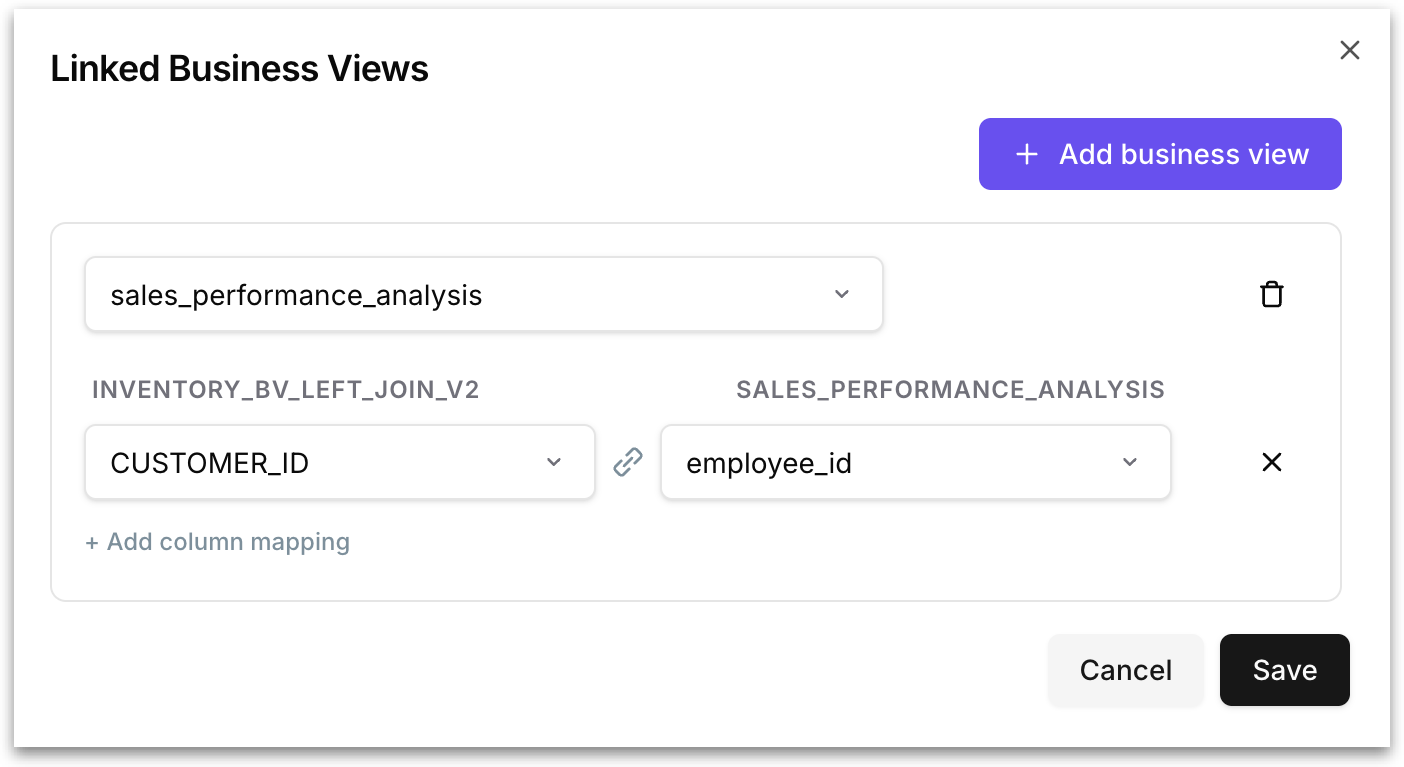
1. Go to **Data → Business Views.** From the three dot menu of the required Business View (this becomes your primary BV), select **Linking** and the following window opens.
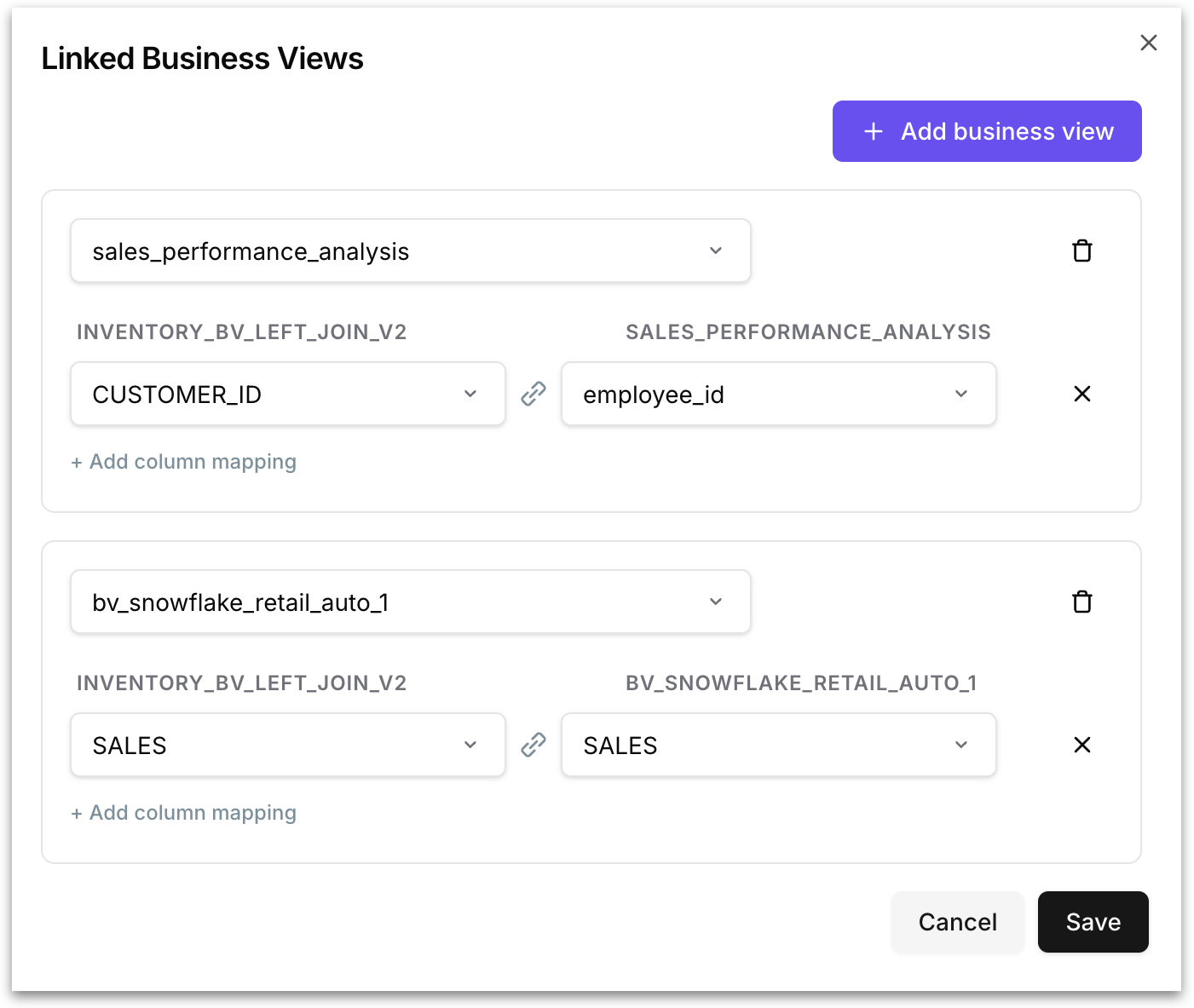
2. Click on **"+ Add business view"** to start a new link. Pick the secondary Business View you want to link to. This is the other BV that Kaiya should be able to join with when answering questions.
3. Match the columns: for each shared idea (account, product, date, and so on), pick the column from the first BV and the matching column from the second BV.
4. If the join needs more than one column to be unique, add the extra column mappings. Click **+ Add column mapping** to add another row.
5. Click on "**+ Add business view"** again to add another link to a different BV. A single source BV can be linked to several target BVs at once. For example, your Inventory BV could be linked to a Sales BV on `customer_id` *and* a Returns BV on `order_id`.
6. Click on **Save.** Once saved, the soft links are live. Kaiya can now answer questions that span the linked column pairs.
{% hint style="info" %}
One link can have multiple column mappings. This is the way you handle joins that need a combination of columns to be unique (compound keys).
{% endhint %}
### What you get when you add soft links?
Once soft links are in place, multi-BV questions become faster and more complete:
* Kaiya runs a single query that joins all the BVs at once. The join happens in your database.
* Kaiya uses the primary BV's calendar (fiscal year, week start) and SQL dialect for the whole question.
For the full picture of what changes with and without soft links, see [Multi-Business Views in Kaiya](/tellius-6.3/kaiya/kaiya-conversational-ai/multi-business-view-conversations.md).
{% hint style="info" %}
It's recommended to link BVs that live in the same database. Soft links work best when both BVs use the same SQL dialect (Snowflake to Snowflake, Redshift to Redshift, and so on).
{% endhint %}
After you set up a soft link, navigate to Kaiya and ask a question that needs data from both linked BVs. With a working link, Kaiya answers in one go and returns data from both BVs.
---
# Agent Instructions
This documentation is published with GitBook. GitBook is the documentation platform designed so that both humans and AI agents can read, navigate, and reason over technical content effectively. Learn more at gitbook.com.
## Querying This Documentation
If you need additional information that is not directly available in this page, you can query the documentation by asking a question.
Perform an HTTP GET request on the following URL with the `ask` and `goal` query parameters:
```
GET https://help.tellius.com/tellius-6.3/data/preparing-your-business-views/soft-linking-a-business-view.md?ask=&goal=
```
`ask` is the immediate question: it should be specific, self-contained, and written in natural language.
`goal` is what the user is ultimately trying to achieve, the reason they need the answer. Sharing it helps GitBook give you a better, more relevant answer. A goal is most helpful when it describes the outcome the user wants rather than restating the question. For example, with `ask=how do I create an API token`, a goal like `automate deployments from our CI pipeline` lets GitBook tailor the answer to that use case.
The response will contain a direct answer to the question and relevant excerpts and sources from the documentation.
Use this mechanism when the answer is not explicitly present in the current page, you need clarification or additional context, or you want to retrieve related documentation sections.