> For the complete documentation index, see [llms.txt](https://help.tellius.com/llms.txt). Markdown versions of documentation pages are available by appending `.md` to page URLs; this page is available as [Markdown](https://help.tellius.com/tellius-6.3/settings/application-settings/email.md).
# Email
Set up SMTP in Tellius to enable alerts, notifications, and reports. Configure authentication, encryption, and validation for reliable email delivery.
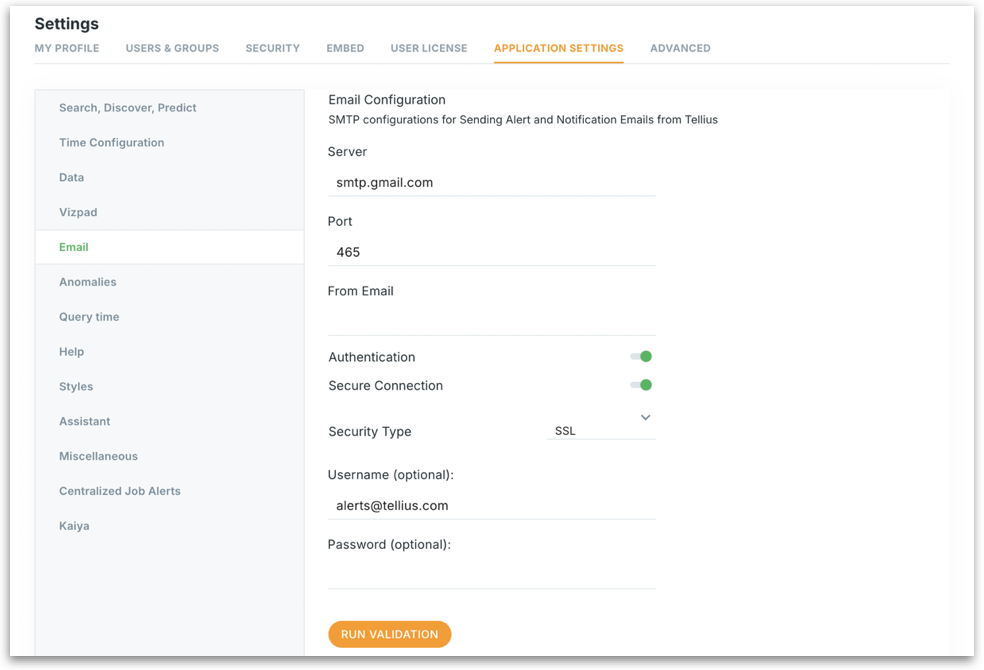
Under **Settings → Application Settings → Email**, admins can set up SMTP (Simple Mail Transfer Protocol) configurations in Tellius. These settings are essential for sending out system-generated emails such as alerts, notifications, anomaly updates, and scheduled report exports.
Email settings
* **Server**\
Enter the SMTP server address used to send emails.
* **Port**\
The port through which Tellius will communicate with your SMTP server.\
Common values:
* `465` for SSL
* `587` for TLS
* **From Email**\
The sender's email address that will appear in the "From" field of emails sent by Tellius.
* **Authentication** \
Enable this if your SMTP server requires login credentials to send emails. Most providers (like Gmail, Outlook, etc.) require authentication.
* **Secure Connection** \
Ensures emails are sent securely using encryption (SSL/TLS). Always recommended for data privacy and protection.
* **Security Type**\
Select the encryption method used by your email provider:
* **SSL** (Secure Sockets Layer): Uses port 465.
* **TLS** (Transport Layer Security): Uses port 587.
* **Username (Optional)**\
Enter the username for SMTP login—usually the same as the "From Email".\
This is required if **Authentication** is enabled.
* **Password (Optional)**\
Enter the SMTP password or an app-specific password. This field is secured and masked.
### Run Validation
1. After entering all necessary details, click on **Run Validation**.
2. Tellius will test the SMTP connection using the provided information.
3. A success or error message will confirm whether the configuration works.
If validation fails:
* Double-check credentials.
* Ensure correct port and security type.
* Confirm firewall or email provider isn't blocking connections.
---
# Agent Instructions
This documentation is published with GitBook. GitBook is the documentation platform designed so that both humans and AI agents can read, navigate, and reason over technical content effectively. Learn more at gitbook.com.
## Querying This Documentation
If you need additional information that is not directly available in this page, you can query the documentation by asking a question.
Perform an HTTP GET request on the following URL with the `ask` and `goal` query parameters:
```
GET https://help.tellius.com/tellius-6.3/settings/application-settings/email.md?ask=&goal=
```
`ask` is the immediate question: it should be specific, self-contained, and written in natural language.
`goal` is what the user is ultimately trying to achieve, the reason they need the answer. Sharing it helps GitBook give you a better, more relevant answer. A goal is most helpful when it describes the outcome the user wants rather than restating the question. For example, with `ask=how do I create an API token`, a goal like `automate deployments from our CI pipeline` lets GitBook tailor the answer to that use case.
The response will contain a direct answer to the question and relevant excerpts and sources from the documentation.
Use this mechanism when the answer is not explicitly present in the current page, you need clarification or additional context, or you want to retrieve related documentation sections.