> For the complete documentation index, see [llms.txt](https://help.tellius.com/llms.txt). Markdown versions of documentation pages are available by appending `.md` to page URLs; this page is available as [Markdown](https://help.tellius.com/tellius-6.3/settings/security/configuration.md).
# Configuration
Configure security settings in Tellius—manage sessions, SSO, sharing permissions, and trusted domains to ensure secure, governed access and data protection.
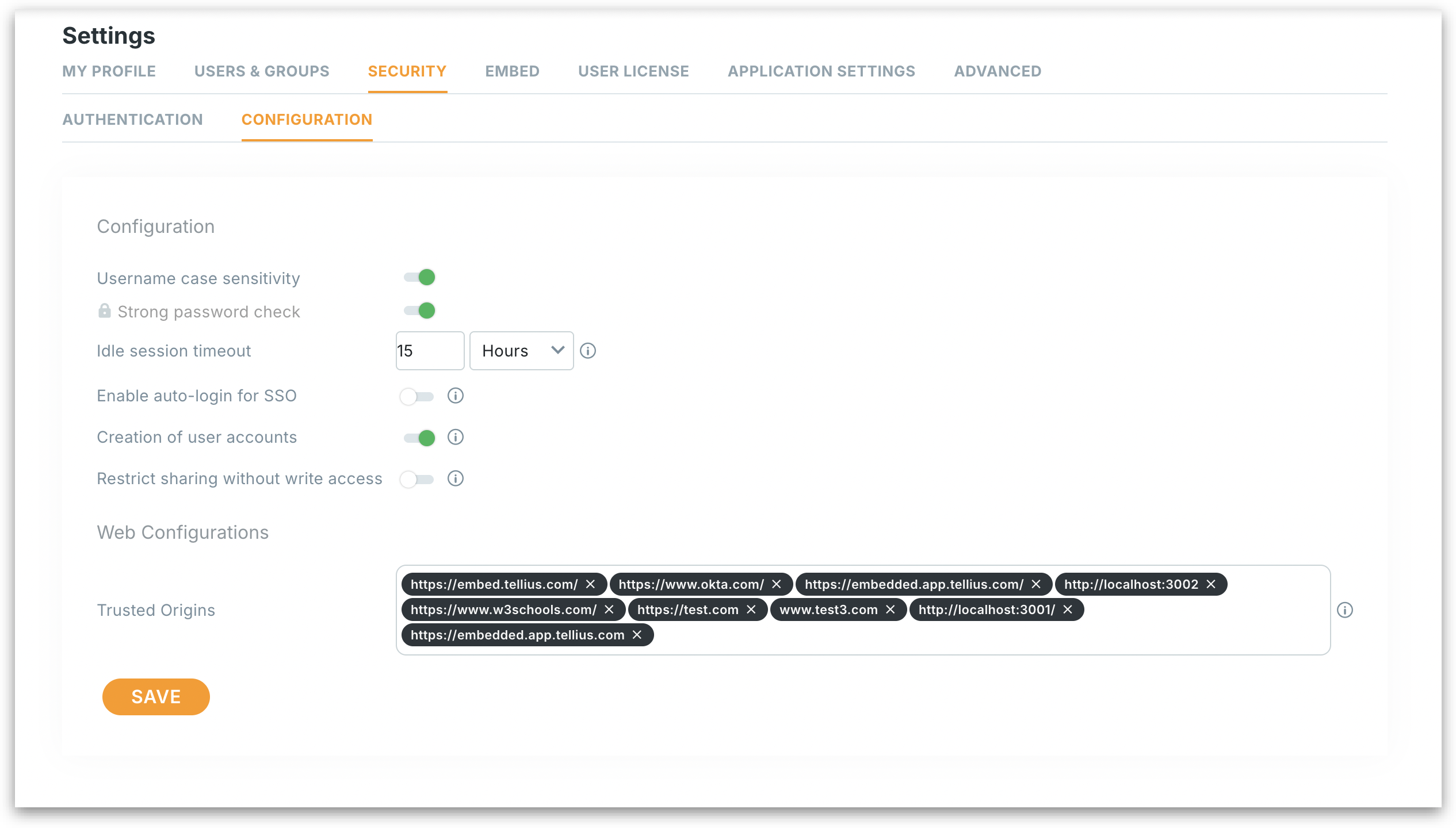
This configuration panel lets admins fine-tune security, access control, and web integration behaviors for the entire Tellius environment. Each setting plays a role in governing user sessions, login behavior, sharing permissions, and trusted sources for embedding content.
Configuration settings
**Username case sensitivity:** Determines whether usernames are treated as case-sensitive. If enabled, `JohnDoe` and `johndoe` are treated as different users.
**Strong password check:** Ensures users create secure passwords with rules such as minimum length, special characters, upper/lower case letters, and numbers.
**Idle session timeout:** Automatically logs users out after a period of inactivity to protect sensitive data. Set the duration and time unit (minutes, hours, or days). Minimum allowed is 15 minutes; maximum is 7 days.
**Enable auto-login for SSO:** Provides a seamless experience by automatically logging users in via their SSO provider.
* If enabled, users are automatically redirected and signed in through their SSO (e.g., Okta, Azure AD) without needing to click “Login.”
* If disabled, users must manually initiate login even if SSO is configured.
**Creation of user accounts:** Controls whether new user accounts can be created within Tellius.
* If enabled, accounts can be auto-provisioned (e.g., on first SSO login) or manually created by admins.
* If disabled, only existing accounts can log in; no new user profiles will be created.
**Restrict sharing without write access:** Prevents users who don’t have write permissions from sharing content with others.
* If enabled, only users with write access can share Vizpads, Insights, etc.
* If disabled, all users, even those with view-only rights, can share content.
**Web configurations:** Specifies a list of approved domains allowed to embed Tellius content. Enter fully qualified domain names (e.g., `https://embed.tellius.com`) such as internal web apps, authorized cloud services, localhosts etc. in the **Trusted Origins** field.
Only these domains can securely interact with Tellius through embedded Vizpads, or APIs.
Click on **Save** button to apply all changes. Changes are applied instantly and may affect session behavior, user access, and embedding permissions across Tellius.
---
# Agent Instructions
This documentation is published with GitBook. GitBook is the documentation platform designed so that both humans and AI agents can read, navigate, and reason over technical content effectively. Learn more at gitbook.com.
## Querying This Documentation
If you need additional information that is not directly available in this page, you can query the documentation by asking a question.
Perform an HTTP GET request on the following URL with the `ask` and `goal` query parameters:
```
GET https://help.tellius.com/tellius-6.3/settings/security/configuration.md?ask=&goal=
```
`ask` is the immediate question: it should be specific, self-contained, and written in natural language.
`goal` is what the user is ultimately trying to achieve, the reason they need the answer. Sharing it helps GitBook give you a better, more relevant answer. A goal is most helpful when it describes the outcome the user wants rather than restating the question. For example, with `ask=how do I create an API token`, a goal like `automate deployments from our CI pipeline` lets GitBook tailor the answer to that use case.
The response will contain a direct answer to the question and relevant excerpts and sources from the documentation.
Use this mechanism when the answer is not explicitly present in the current page, you need clarification or additional context, or you want to retrieve related documentation sections.