> For the complete documentation index, see [llms.txt](https://help.tellius.com/llms.txt). Markdown versions of documentation pages are available by appending `.md` to page URLs; this page is available as [Markdown](https://help.tellius.com/tellius-6.4/embedding-tellius/embedding-url/embedding-kaiya.md).
# Embedding Kaiya
Embed Kaiya conversational AI into your apps using iFrame and postMessage API to enable natural language questions, instant insights, and a seamless chat experience.
Kaiya, the conversational AI assistant in Tellius, can be embedded into external applications to enable natural language querying and interaction with data directly within your app via iFrame. This allows users to ask natural language questions, receive data-driven answers, and view visualizations in a chat-like interface, without leaving your application.
### **Steps to obtain the embed URL**
1. Under **Settings → Modules → Embedding → Kaiya**, click on **Generate Embed URL** to view the embedding URL window.
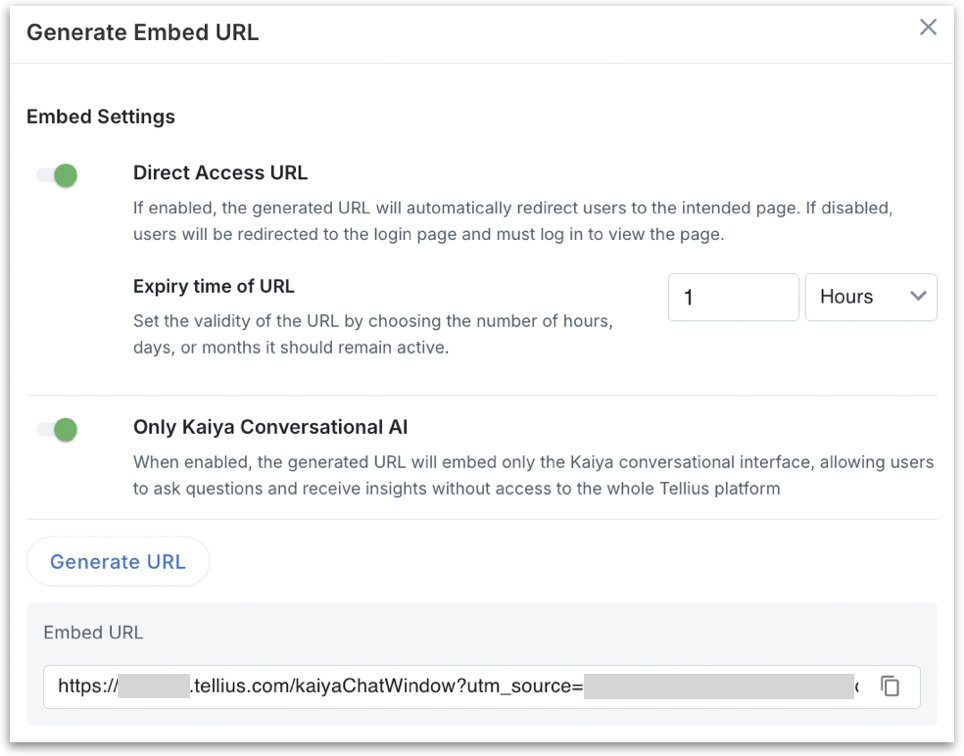
2. Once you click on **Generate Embed URL**, the following window will be displayed.
In Tellius 6.4, the window looks like this:
3. **Direct Access URL (toggle):** When enabled, users accessing the embedded URL are taken directly to the embedded Kaiya conversations interface (no login prompt). This only works when the token (passed via `utm_source`) has valid session context. When disabled, users will be redirected to the Tellius login screen before reaching the embedded component. Use this when you want user-level authentication to be enforced on access.
4. **Expiry time of URL:** Appears when **Direct Access URL** is on. Controls how long the generated embedding URL remains valid. Specify the duration in hours, days, or months. After the set time, the token (`utm_source` or similar context ID) expires, and the link becomes invalid.
5. **Enable Row Level Policy:** Turn this on when your app sends row-level filters for each user, so each user sees only the rows they're allowed to see. The embedded Kaiya then waits up to 30 seconds for the `INITIALIZE_ROW_LEVEL_POLICY` message before it loads; if none arrives, it shows a message that the request for your Row Level Policies timed out. The message format is the same as for Vizpads; see [Row-level policy filters](/tellius-6.4/embedding-tellius/embedding-url/embedding-vizpads/row-level-policy-filters.md).
6. **Only Kaiya Conversational AI (releases before Tellius 6.4):** In releases before Tellius 6.4, the window also had this toggle. Turn this on when generating an Embed URL to deliver a chat-only Kaiya experience for portals or apps. The URL loads just the conversational window, so users can ask questions in natural language and get guided answers in a minimal UI. A small **Open in Kaiya** button (top-right) lets authorized users jump to the full Kaiya interface (with sidebar and search inspector) when deeper exploration is needed.
7. Once you click on **Generate URL**, the Embed URL will be generated.
8. Click on the **Copy** icon to copy the URL.
9. An embedding URL looks like the following: `https://domain/kaiya/chat/conversation/new?utm_source=ID`
10. Once you embed the URL, the **Kaiya** conversations page will be loaded.
---
# Agent Instructions
This documentation is published with GitBook. GitBook is the documentation platform designed so that both humans and AI agents can read, navigate, and reason over technical content effectively. Learn more at gitbook.com.
## Querying This Documentation
If you need additional information that is not directly available in this page, you can query the documentation by asking a question.
Perform an HTTP GET request on the following URL with the `ask` and `goal` query parameters:
```
GET https://help.tellius.com/tellius-6.4/embedding-tellius/embedding-url/embedding-kaiya.md?ask=&goal=
```
`ask` is the immediate question: it should be specific, self-contained, and written in natural language.
`goal` is what the user is ultimately trying to achieve, the reason they need the answer. Sharing it helps GitBook give you a better, more relevant answer. A goal is most helpful when it describes the outcome the user wants rather than restating the question. For example, with `ask=how do I create an API token`, a goal like `automate deployments from our CI pipeline` lets GitBook tailor the answer to that use case.
The response will contain a direct answer to the question and relevant excerpts and sources from the documentation.
Use this mechanism when the answer is not explicitly present in the current page, you need clarification or additional context, or you want to retrieve related documentation sections.