> For the complete documentation index, see [llms.txt](https://help.tellius.com/llms.txt). Markdown versions of documentation pages are available by appending `.md` to page URLs; this page is available as [Markdown](https://help.tellius.com/tellius-documentation/search/executing-a-search-query/marketshare-queries.md).
# Marketshare queries
Learn how to write marketshare queries with proper syntax, filters, comparisons, and change-over-time logic to measure performance accurately across segments.
Marketshare is a performance metric used to measure a company's sales or market share relative to the total sales or performance of a specific market or industry. The following documentation includes syntax and examples that will help you understand how to accurately calculate marketshare and get valuable insights into your company's performance.
### **Syntax**
Marketshare **KPI** for **target variable** for/by **filters/dimensions**
* **Green-colored text** represents the KPI (key performance indicator) that you want to measure, such as *TRx* or *NRx*. It is always the word that follows “Marketshare”.
* **Red-colored text** is the target variable or marketshare filter (i.e., filter in numerator which will not be present in the denominator). This is the text that follows the KPI; unless there is a "vs" or "compared to" keyword, in which case it would be the first two words.
* **Blue-colored text** is the list of global filters (the parameters you want to apply in your marketshare analysis). There could be multiple filters after a "for" or "in”.
{% hint style="info" %}
For refined search query results, please make sure to add a time period. Example: *for last 4 weeks, in 2023*
{% endhint %}
### **Examples**
#### Marketshare **dollar sales** for **Brand A** in **2019**
#### Marketshare **dollar sales** for **Brand A** vs **Brand B** for **New York** for **Derm**
is the same as
#### Marketshare **dollar sales** for **Brand A** compared to **Brand B** for **Derm** for **New York**
#### **Marketshare ****dollar sales**** for ****brand**** by ****state**
This shows the multiple values for each brand for a particular state, where the different brands would sum upto 100%
#### **Marketshare ****dollar sales**** for ****state**** by ****brand**
This shows the multiple values for each brand with the shares of state among other tiers (where the different brands would not sum upto 100%)
**Marketshare ****dollar sales**** for ****Brand X**** by ****segment**
This shows the share of sales Brand X has within each segment (which does not add up to 100%)
#### **Marketshare ****dollar sales**** for/by ****segment**** for ****Brand X**
This shows the share of each segment's sales for Brand X (same as the percentage of dollar sales in XYZ, and adds up to 100%)
#### **Marketshare ****dollar sales**** for ****Brand X**** in 2021 compared to 2022**
### **Change in marketshare**
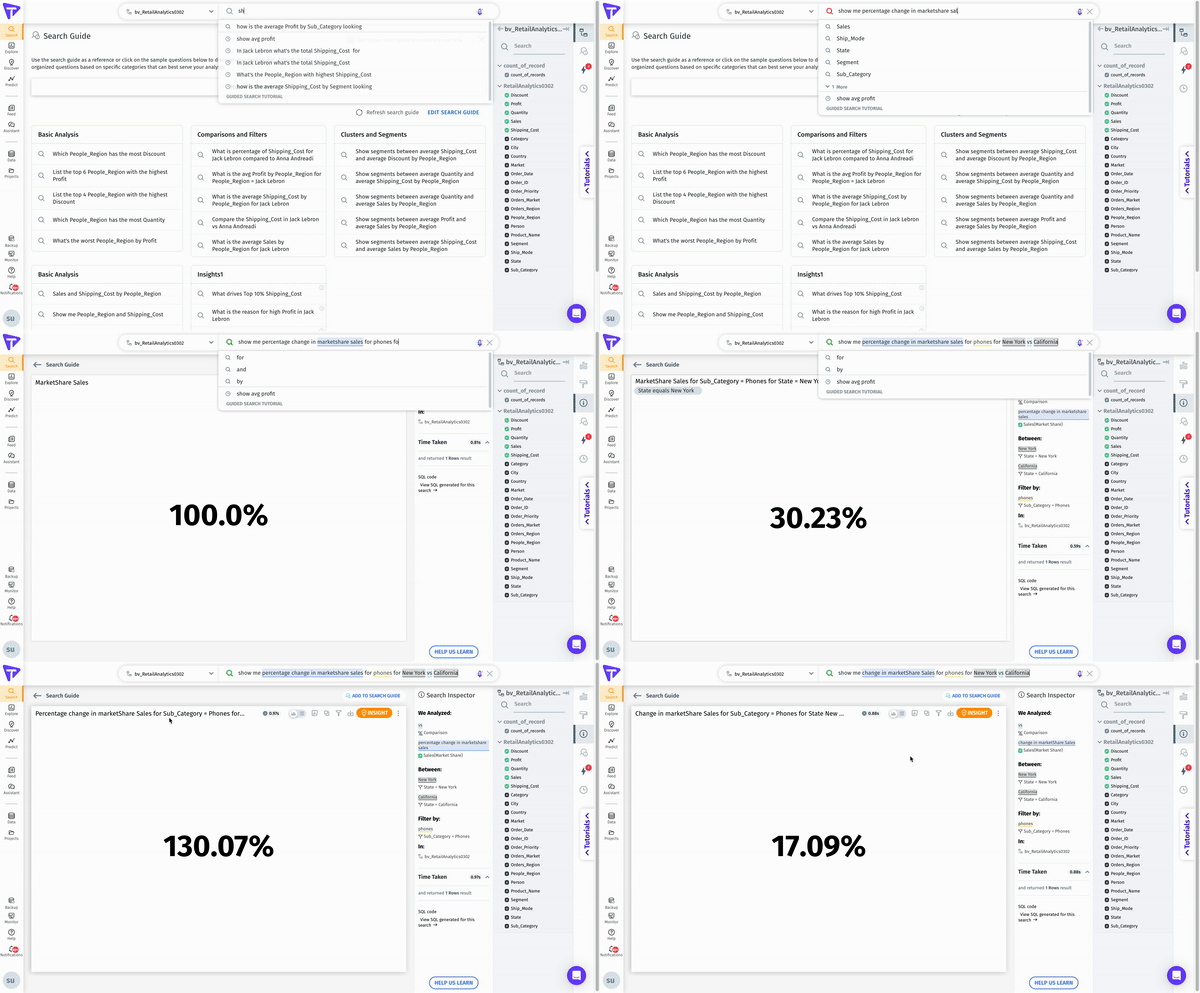
"Change in market share" refers to the variation in the percentage of a company's sales (or another relevant measure) within a specific market or industry over a given time period. This change can be due to factors such as new product launches, pricing strategies, marketing efforts, or changes in consumer behavior. Understanding the "change in market share" helps businesses evaluate the effectiveness of their strategies, monitor competition, and identify market trends.
Now, from 4.2 version, users can now include "**change in market share"** keyword for marketshare-related queries. With this out-of-the-box support for "change in market share" keyword, users can now better analyze changes in market share over time or across different conditions, empowering their decision-making process.
It's important to understand that the placement of the target variable in the query can significantly affect the resulting data. For instance, the two queries below provide different outputs due to the change in position of 'Advil', the target variable:
* `market share of dollar sales for Advil by segment`
* `market share of dollar sales by segment for Advil`
When adding a filter for the target variable and breaking it down by another filter, a new type of query arises. For example, `market share of dollar sales for Advil for adult internals for retailers` . To compare these results over different time periods, such as the "last 4 weeks vs the same period a year ago", we've introduced support for "**change in market share**" keyword queries.
#### **Syntax for change in market share**
To utilize this feature, ensure you provide the following values in the query where the target variable appears after the measure column. The syntaxes are,
* **Standard Syntax**: Show me \[change/percentage change/percent change] in market share **\** for **\** for **\** \[vs/ compared to] **\**
* **Syntax with Global Filters**: Show me \[change/percentage change/percent change] in market share **\** for **\** for **\** \[vs/ compared to] **\** for X1 for X2
Here,
* **M1** represents the measure
* **V1** represents the target variables
* **F1** and **F2** represent a list of filters for the target population, with multiple filters following "for" or "in"
* **X1** and **X2** represent a list of global filters, including dimension or date columns
Users can now execute queries such as:
* Show me \[change/percentage change/percent change] in market share **Sales** for **Nike** for **New York** vs **California**
* Show me \[change/percentage change/percent change] in market share **Sales** for **GoPro** for **North America** vs **South America** for 2022
* Show me \[change/percentage change/percent change] in market share **Sales** for **Nike** for **New York** vs **California** for 2022 for First-class shipping
{% hint style="info" %}
From v4.3, users can assess the percentage change in market share without specifying a target filter.
{% endhint %}
### **Syntax and examples of queries that can be executed**
Here \ and \ represent dimensions or time periods
**Syntax 1:** Show me change/percentage change in marketshare \ by \ for/in \ compared to/vs. \
**Example 1:** Show me change/percentage change in marketshare sales by category for/in California compared to/vs. Washington
**Syntax 2:** Show me change/percentage change in marketshare \ by \ for/in \ compared to/vs. \
**Example 2:** Show me change/percentage change in marketshare sales by category for/in 2013 compared to 2014
**Syntax 3:** Show me change/percentage change in marketshare \ for/in \ compared to/vs. \
**Example 3:** Show me change/percentage change in marketshare sales for/in California compared to/vs. Washington
---
# Agent Instructions
This documentation is published with GitBook. GitBook is the documentation platform designed so that both humans and AI agents can read, navigate, and reason over technical content effectively. Learn more at gitbook.com.
## Querying This Documentation
If you need additional information that is not directly available in this page, you can query the documentation by asking a question.
Perform an HTTP GET request on the following URL with the `ask` and `goal` query parameters:
```
GET https://help.tellius.com/tellius-documentation/search/executing-a-search-query/marketshare-queries.md?ask=&goal=
```
`ask` is the immediate question: it should be specific, self-contained, and written in natural language.
`goal` is what the user is ultimately trying to achieve, the reason they need the answer. Sharing it helps GitBook give you a better, more relevant answer. A goal is most helpful when it describes the outcome the user wants rather than restating the question. For example, with `ask=how do I create an API token`, a goal like `automate deployments from our CI pipeline` lets GitBook tailor the answer to that use case.
The response will contain a direct answer to the question and relevant excerpts and sources from the documentation.
Use this mechanism when the answer is not explicitly present in the current page, you need clarification or additional context, or you want to retrieve related documentation sections.