> For the complete documentation index, see [llms.txt](https://help.tellius.com/llms.txt). Markdown versions of documentation pages are available by appending `.md` to page URLs; this page is available as [Markdown](https://help.tellius.com/tellius-documentation/settings/users-and-groups/synchronization.md).
# Synchronization
Manage automated Azure AD user and group syncing in Tellius with scheduled updates, filters, role mapping, and detailed logs to keep access and identities aligned.
Under **Settings** **→ Users & Groups → Synchronization,** the User-Group Synchronization allows seamless integration with Azure Active Directory (Azure AD), enabling automated user and group provisioning. This reduces manual effort, ensures data consistency, and centralizes access management—especially for organizations using SAML-based authentication.
This tab allows admins to configure:
* One-time or scheduled sync
* User-group mapping
* Filter criteria for groups
* Synchronization logs
Synchronization
### **IdP Connection Panel**
An IdP (Identity Provider) connection is required to authenticate and manage users and groups securely from a centralized source like Azure AD. It allows Tellius to sync users and groups automatically from your organization’s identity system.
This ensures single sign-on (SSO) access and role-based provisioning. Makes Azure AD (or your IdP) the source of truth—removing the need for manual user/group management in Tellius.
IdP connection panel
* **Identity Provide (IdP):** Provide the IdP in the dropdown. For now, only **Azure AD** is supported.
* **Tenant ID:** Unique identifier for your Azure tenant.
* **Client ID:** Application ID registered in Azure.
* **Client Secret:** Secure key generated from Azure to authorize API access.
* Click on **Connect** to establish connection between Tellius and Azure AD.
* Click on **Disconnect** to break the connection and re-enables manual group management.
* Click on **Cancel** to dismiss without saving changes.
{% hint style="info" %}
Once connected, all user and group sync logic is managed via Azure AD. Manual group edits in Tellius are disabled to preserve IdP as the source of truth.
{% endhint %}
### Users Synchronization
If enabled, Tellius will automatically sync users based on Azure AD membership. I
Define the **Azure AD group name. I**t will synchronize only the users in the specified group(s). This ensures that only members of those Azure AD groups are managed and updated within Tellius.
{% hint style="info" %}
New users are auto-provisioned upon their first login with assigned access and roles.
{% endhint %}
### Groups Synchronization
The Groups Synchronization panel allows admins to manage group-level synchronization from an external IdP.
If the **Groups Synchronization** section is enabled, then you can apply filters for the groups. This ensures that only Azure AD groups matching the specified filter are imported into Tellius, helping to control and limit which groups are brought into the platform.
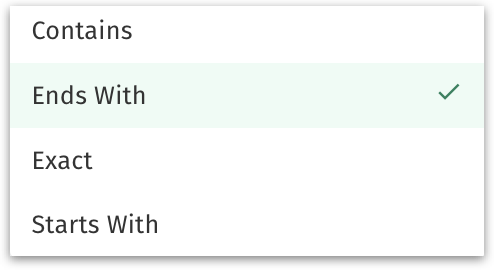
Provide the filter operator and value:
Filter operator
### Scheduled Synchronization
The **Scheduled Synchronization** panel allows admins to automate the syncing of users and groups between Tellius and an external IdP. This ensures that user data and group memberships remain up to date.
* Enable the toggle to activate synchronization.
* Set up the start date and start time when the first scheduled sync should begin.
* Define how often the sync should repeat and the interval unit (day, hour , minute, week, year).
A dynamic confirmation message at the bottom summarizes your setup:
*"User and user group synchronization will start at \ at \ and will repeat every \ \."*
{% hint style="warning" %}
Manual edits in Tellius are restricted once scheduled sync is enabled to maintain consistency. Azure AD becomes the single source of truth for user-group mappings. New users are auto-provisioned at first login based on Azure AD membership.
{% endhint %}
Click on **Save** button to commit the changes made and start the synchronization of users and groups.
### Synchronization Log
The **Synchronization Log** provides a historical view of all user and group synchronization attempts between Tellius and your connected IdP, such as Azure AD. Helpful for admins to track, audit, and troubleshoot synchronization issues in real time.
Sync log
**Date:** The calendar date when the sync was executed
**Time:** The exact time the sync started
**Duration:** How long the sync process took
**Status**: Indicates whether the sync succeeded or failed.
**Info:** A detailed log message explaining the sync operation and any errors encountered, including system-generated error codes and descriptions
---
# Agent Instructions
This documentation is published with GitBook. GitBook is the documentation platform designed so that both humans and AI agents can read, navigate, and reason over technical content effectively. Learn more at gitbook.com.
## Querying This Documentation
If you need additional information that is not directly available in this page, you can query the documentation dynamically by asking a question.
Perform an HTTP GET request on the current page URL with the `ask` query parameter, and the optional `goal` query parameter:
```
GET https://help.tellius.com/tellius-documentation/settings/users-and-groups/synchronization.md?ask=&goal=
```
`ask` is the immediate question: it should be specific, self-contained, and written in natural language.
`goal` is optional and describes the broader end goal you are ultimately trying to accomplish on behalf of the user. GitBook uses it to tailor the answer towards what is most useful for that goal.
The response will contain a direct answer to the question and relevant excerpts and sources from the documentation.
Use this mechanism when the answer is not explicitly present in the current page, you need clarification or additional context, or you want to retrieve related documentation sections.