
Patch 6.0.1
Tellius 6.0.1: faster Vizpads, smarter filters & tables, calendar-aware Kaiya with row-level security, and real-time job updates.
Here’s what’s new in Tellius v6.0.1: a quality-focused update that sharpens day-to-day speed, clarity, and control. Vizpads get faster KPI rendering, cleaner tables/pivots, sturdier filters, and smarter limits and error handling. Kaiya adds richer governance and better conversation flow, including row-level policy enforcement. Admins gain simpler, clearer settings and model choices, while notifications and background jobs update in real time for a smoother handoff.
📈 Enhancements
We retired the following toggles
Enable Text-to-SQL for Unsupported Queries
Enable SRL for Analytics Node
Enable User Clarifications for Analytics Node
and added two dropdowns for admins in Settings → Kaiya → Conversational AI → Advanced:
Analytical Node Mode: Chooses how Kaiya runs analysis: always SQL, always SRL, or Auto to pick per query for the best speed vs. reasoning.
Clarification Mode: To disambiguate and understand intent, Kaiya now supports session-scoped multi-step follow-ups with clickable options, and your selections are reused in subsequent queries so you’re not asked again. Set the frequency to High/Medium/Low/None to balance precision vs. zero interruption.
Agentic workflows now adapt if an intermediate step returns no rows: Tellius automatically retries with a broadened plan and clearly marks that step as Skipped. The Thought Process view adds iteration-aware labels (e.g., 1-Step 1, 2-Step 1) and enhanced success messages, making it easy to follow retries and results at a glance.
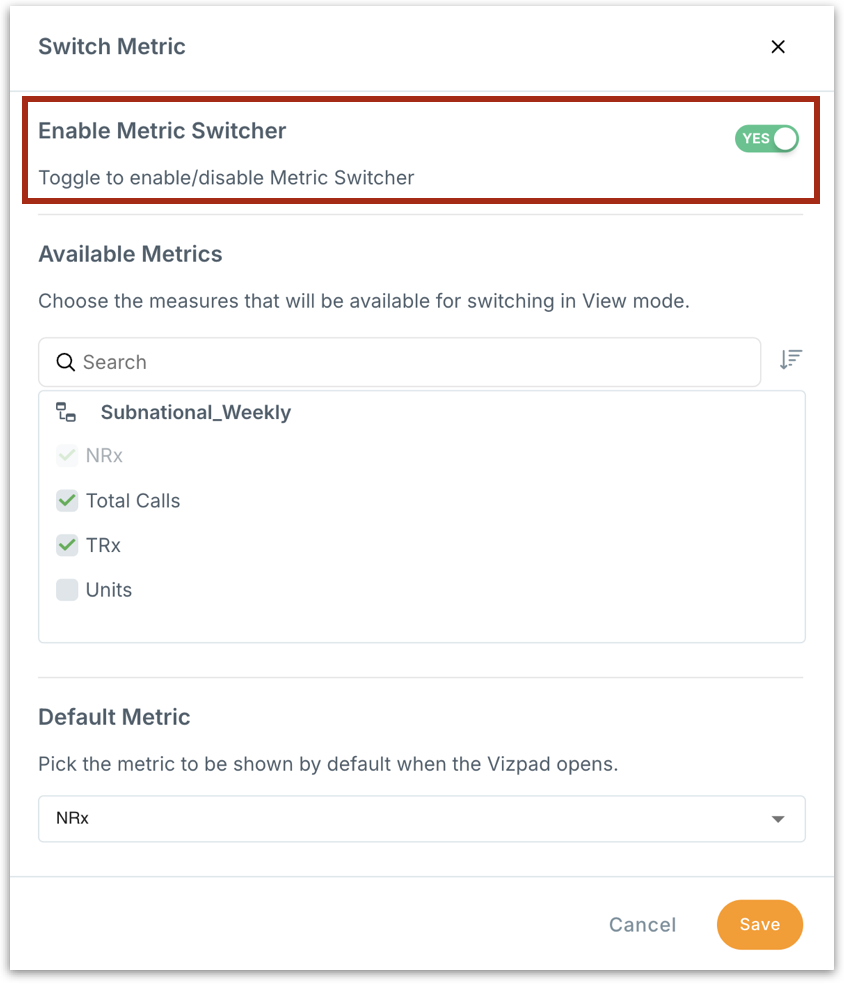
You can now enable/disable the display of Metric Switcher from a Vizpad in Edit mode with a new Enable Metric Switcher toggle, hiding/showing the switcher setup.
In the Notifications page, clicking a “Dataset loaded” notification now opens the specific dataset page directly. This applies to both single and bulk loads for a faster, friction-free handoff from notifications.
Updates to the Fiscal Calendar now apply to existing Vizpads after a refresh. If you’ve recently edited the calendar and don’t see the new labels, use Clear cache and reload the Vizpad, and the charts will reflect your latest settings.
In Vizpads, tables and pivot tables now support adjustable font sizes (up to 22px) for headers and values, with responsive layout safeguards to keep content readable across screen sizes and exports.
Kaiya now honors row-level policies end-to-end. Row-level policies are enforced throughout query generation and summaries so users only see permitted data.
Kaiya now honors your Business View’s custom/fiscal calendars (e.g., 4-4-5, custom week start) when parsing time-related phrases.
When a load/refresh/model/scheduled job finishes, the row automatically switches from Running to Success or Failure without needing a page refresh, and Time Taken duration is finalized instantly.
🛠️ Minor fixes
Fixed a configuration issue that could block SAML sign-in for some identity providers when the HTTP flag was enabled.
In Vizpads, fixed the issue where switching a chart in Live Business Views (BV) could trigger an error, especially after switching the time dimension or when a time filter from one BV was applied to a chart from another BV.
In Vizpads, fixed an issue where copy-pasted charts sometimes reverted to their old layout after resizing.
In Vizpads, fixed an issue where time-resolution changes saved in a Custom View didn’t persist after switching to the Master View and back.
In Kaiya, optimized conversation loading so heavy analysis details fetch only when you open a message. This makes long threads (with multiple charts/outputs) open and scroll noticeably faster.
In Vizpads, fixed an issue where the Select All button in the selective filter popup didn’t select the chart when only one chart was present on the tab.
In Vizpads, fixed the issue where chart icons were missing in the Select charts to apply filter menu.
In Vizpad tables, fixed an issue where the Drill/Keep/Remove context menu sometimes failed to appear or required a page refresh.
In advanced pivot tables of Vizpads, reordering columns and customizing column widths in View mode no longer overwrite the saved order when new columns are added in Edit mode. “Keep” selections and expand/collapse states are now preserved as configured.
Under Settings → Advanced → Kaiya, admins can choose Default, GPT 5, or Claude Sonnet to better match the deployed model. Takes effect immediately across the environment; if unset, we use Default.
In Vizpads, fixed an issue in Advanced Pivot where adding a new measure to a saved table created a separate measure group. New measures now align with the existing group and preserve the configured column order.
Improved conversation loading in Kaiya. Switching conversations (including via the browser Back/Forward buttons) is now faster and reliably shows only the active thread’s messages.
On service startup, Tellius now automatically validates its internal calendar data and repairs it if any inconsistencies are detected, ensuring accurate time resolutions.
Charts and summaries now bucket data by the correct calendar week (with year-aware labels like 2024-W06/W07/W08), preventing duplicate/identical period values.
In Vizpads, fixed an issue where the Selective filter window showed an incorrect “Selected charts” count after removing a chart.
Improved Kaiya conversation loading and scrolling. Long threads now load earlier messages and scroll through seamlessly.
In Vizpads, fixed incorrect popup text when converting a Dropdown List (multi-select) to a Single-Select filter.
Under Data → Business Views, fixed a layout issue in Share Business View where very long user names overlapped with the permission dropdown and remove icon.
Under Feed → Manage Feed, resolved an issue where removing a Drilldown dimension did not clear its levels in the saved configuration.
When building multi-condition Feed alerts, fixed values (e.g., 10) are now saved when you press Enter or Tab, or click away, with inline validation for blanks and invalid numbers.
In Vizpads, KPI tiles now render faster and more smoothly thanks to smarter rendering (no duplicate re-renders) and memoized selectors. Text styling has been tuned for clarity and consistency, improving readability across sizes and layouts.
We’ve unified error handling in the Vizpad Edit mode, which means clearer, consistent messages and standardized retry behavior.
In Kaiya’s Agent Library, deleting an agent now works consistently and persists across refreshes, tab switches (Published/Draft), and module navigation.
In Vizpads, resolved an issue where, after cloning a Vizpad or tab and adding control filters from a new Business View, the global filter pill could disappear or duplicate when changing values.
Cloning a tab that already has control filters with selected values no longer shows an incorrect “Multiple filters detected for column …” message.
In Kaiya, updated the conversation scrolling so the question bar now stays pinned while you scroll, keeping your prompt visible and editable at all times.
In Vizpads, pivot tables now have clearer highlights and cleaner borders, making collapsible areas and hovered rows easier to see.
In Vizpads, resolved an issue where changing a control filter on a cloned chart in View mode reverted to its original position while still applying in the background.
In each Vizpad tab you can add up to 25 charts. When the limit is reached, attempts to add another counted chart will be blocked with an error message (except KPIs, Text, Images, and Filter Controls).
In Vizpads, if a chart hits an error while the page is still loading, View Details now stays clickable. This lets you immediately see what went wrong and retry or fix it.
In Vizpads, refined the chart interaction menu (Keep, Remove, Drill etc.) so it stays correctly positioned and fully visible across screen sizes and zoom levels. Icons and tooltips now render consistently with improved spacing.
Was this helpful?