> For the complete documentation index, see [llms.txt](https://help.tellius.com/llms.txt). Markdown versions of documentation pages are available by appending `.md` to page URLs; this page is available as [Markdown](https://help.tellius.com/6.0/embedding-tellius/embedding-url/embedding-vizpads.md).
# Embedding Vizpads
Learn how to embed Tellius Vizpads into your application using iFrame URLs and postMessage integration for interactive analytics.
Using the following steps, you can embed (using iFrame) Vizpad into your app.
The **embedded app** refers to Tellius, whereas the **embedding app** refers to the app in which Tellius components are to be integrated.
1. Get the embedding URL from Tellius.
2. Include the embedding URL in the HTML of the required app.
3. Connect the app with Tellius.
### **Getting the embedding URL**
There are two ways in which you can obtain the embedding URL: directly from the Vizpad or from **Settings.**
#### **From a Vizpad**
1. Open the required Vizpad under **Explore**, and click on the **Share** button at the top right corner.
Embedding from Vizpad
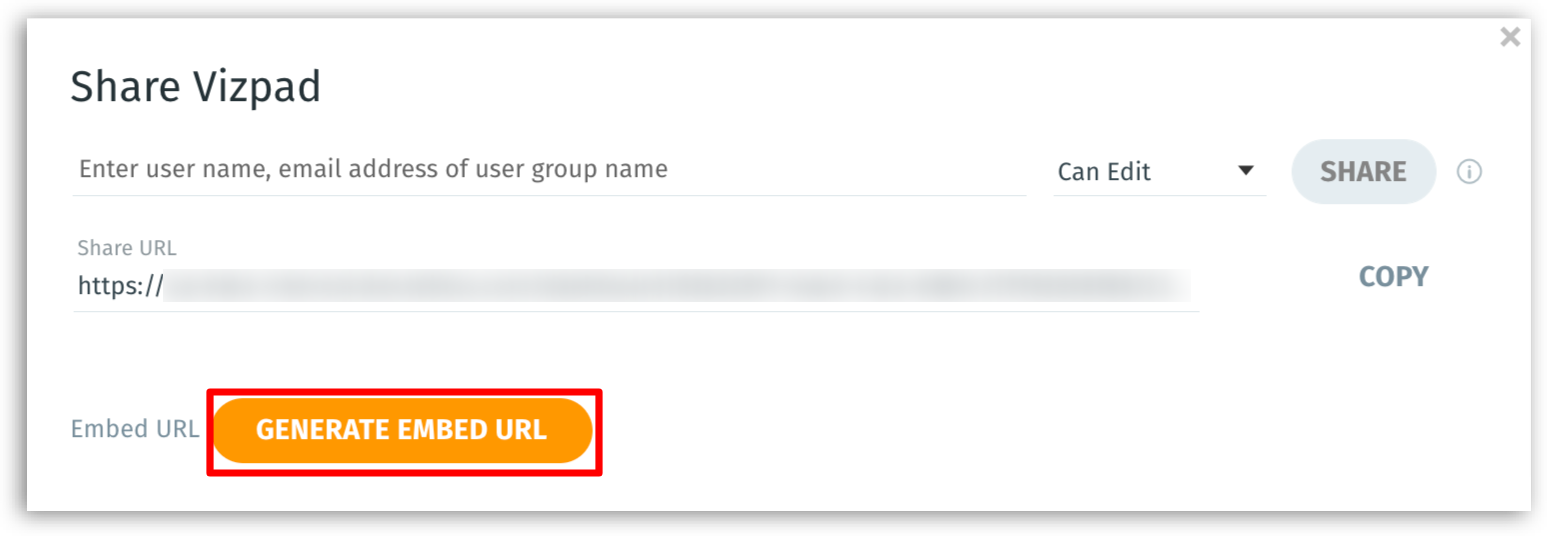
2. Click on **Generate Embed URL**. Once the URL is generated, select the required permission (view/edit) and click on **Copy**.
Generate embed URL
#### **From Settings**
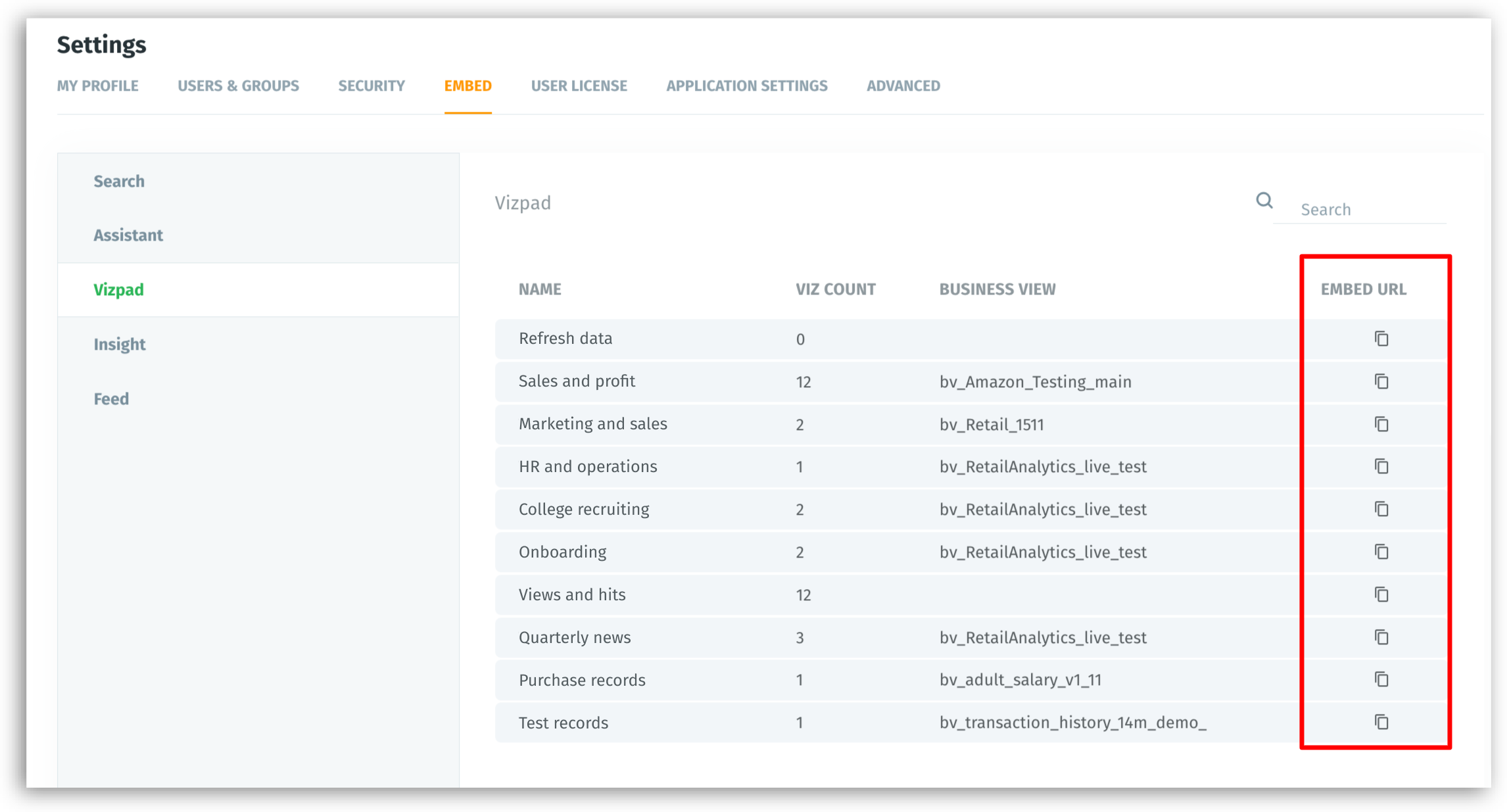
1. Navigate **Settings → Embed → Vizpads**. The list of existing Vizpads is displayed.
2. For the required Vizpad, click on the **Copy** button under **Embed URL**.
Embed URL from Settings
### **Including the obtained URL**
An embedding URL looks like the following:
`http://domain/dashboard/vizpadId/tabId/?utm_source=ID`
Once you embed the URL, the required Vizpad will be loaded.
#### **Components of the embedding URL**
* `vizpadId` - the ID of the Vizpad to be embedded
* `tabId` - As per the tabID specified in the embedding URL, the current tab will be set.
* `datasetId` - the ID of the dataset to which the Vizpad belongs
**Connecting with Tellius**
1. The embedding app needs to send a message `INITIALIZE` to connect with Tellius.
2. Tellius validates and responds with `TELLIUS_INITIALIZED` message as an acknowledgment.
3. After receiving`TELLIUS_INITIALIZED` message, the required filters can be applied.
The following is a sample code to connect with Tellius:
```javascript
var telliusFrame ;
document.querySelector("iframe").addEventListener("load", function() {
telliusFrame = document.getElementsByTagName("iframe")[0].contentWindow;
telliusFrame.postMessage('INITIALIZE', "*");
})
function receiveMessage(event) {
if(event.data === 'TELLIUS_INITIALIZED') {
telliusFrame.postMessage({
actionType: "getVizpadFiltersApplied",
}, "*");
}
}
window.addEventListener("message", receiveMessage, false);
```
As furnished in the code above, we use `window.postMessage` for communication between Tellius and the embedding app (two-way communication). The messages which are sent to Tellius from the embedding app are included in `telliusFrame.postMessage()`. With the help of the function `postMessage`, required actions can be performed.
To enable this communication and to receive messages, the embedding app needs to have `eventListener`. For every point clicked, or area selected/highlighted in the chart, Tellius will send a message to the embedding app.
**Structure of a Vizpad**
Each Vizpad consists of one or more tabs. Each tab can have multiple Viz. A Viz is a chart widget, and it is a component of a Vizpad. The following sample code shows the structure of a Vizpad and a Viz.
Utmost, a Vizpad can have 10 tabs, and a tab can have 25 Viz.
```json
sharings: []
vizPad: {vizItemsCount: 3, updatedAt: "2020-07-07T07:05:34.141827", title: "Untitled 202007061840",..}
businessViewId: "enter_ID_of_business_view"
colorPaletteId: "enter_ID_of_color_palette"
createdAt: "2020-07-06T13:10:32.393827"
elements: []
gradientPaletteId: "ae5a3524-5d49-415d-901a-ecf6ecf376d8"
id: "5e833be1-e904-4d3e-af27-99422d3ec2b7"
owner: {username: "superUser", id: "ID_of_the_owner"}
placement: []
settings: {}
sharedWith: []
sharingByLink: true
tabs: [{placements: [, …], name: "Tab 1", id: "45b78c0b-b690-4b08-a7de-0b7a980dc1fe", …}, {, …}]
0: {placements: [, …], name: "Tab 1", id: "enter_ID_here", ...}
1: {, …}
id: "89cad4a5-944d-46b6-ac36-3401de292de3"
name: "Tab 2"
placements: [{vizTitle: "Title viz621", vizId: "ID_of_the_viz", sizeY: 4, sizeX: 4, ...}]
thumbnail: "e0a8e8a0-4fa7-4875-a0a2-8c9b050d88f9"
timeRange: {}
title: "Title 202007061840"
updatedAt: "2020-07-07T07:05:34.141827"
vizItemsCount: 3
```
**Structure of a Viz**
```json
{
"vizType": "chart",
"version": "3.4",
"updatedAt": "2022-12-28T12:30:35.330508",
"unuse": [],
"title": "sum Row_ID by Country, Ship_Mode",
"theme": {
"vizBackground": {
"transparency": "0.9",
"image": "img/test",
"color": "white"
},
"name": "dark",
"color": "black"
},
"tab": "23b1dd9f-b756-4b38-9fb0-372e2e011aff",
"sortBy": [],
"size": {
"width": 4,
"height": 4
},
"secondaryGroupBy": {
"stackBy": [],
"colorBy": [
{
"columnName": "Ship_Mode"
}
]
},
"placement": {
"yDistance": 8,
"xDistance": 4
},
"pagination": {
"offset": 0,
"maximumAllowedRows": 10000,
"isTruncated": false,
"allowPagination": true
},
"owner": {
"username": "superUser",
"id": "ID_of_owner"
},
"metadata": {
"format": {
"title": {
"font": {
"weight": "normal",
"size": "16",
"color": "#000000"
},
"enabled": true
},
"legend": {
"font": {
"weight": "normal",
"size": "14",
"color": "#78909c"
},
"enabled": true
},
"colorPaletteInfo": {
"colors": [
"#3252DB",
"#0AB759",
"#D33131",
"#FF9F28",
"#05C4FF",
"#FFEA00",
"#EA08D5",
"#A1EA04",
"#4784ED",
"#00D9EF",
"#C62FBF",
"#029C01",
"#F44A10",
"#07C9AD",
"#FFEC40",
"#00EDED",
"#607D8B",
"#FED400",
"#00C802",
"#00D6B2",
"#ED3D00",
"#795548"
]
},
"background": {
"enableGrid": false,
"color": "#FFFFFF"
},
"axes": {
"yAxis": {
"enabled": true
},
"xAxis": {
"enabled": true
},
"font": {
"weight": "normal",
"size": "14",
"color": "#78909c"
}
}
},
"dualAxis": true,
"colorPalette": "ID_of_colorPalette"
},
"id": "047aed12-9871-49e5-a31a-9813817979b0",
"createdAt": "2022-12-28T12:30:35.330502",
"colorPaletteDetails": {
"name": "Tellius 1",
"id": "ID_of_colorPaletteDetails",
"colors": [
{
"name": "#1565C0",
"color": "#1565C0"
},
{
"name": "#F57F17",
"color": "#F57F17"
},
{
"name": "#558B2F",
"color": "#558B2F"
},
{
"name": "#BF360C",
"color": "#BF360C"
},
{
"name": "#5E35B1",
"color": "#5E35B1"
},
{
"name": "#00838F",
"color": "#00838F"
},
{
"name": "#C62828",
"color": "#C62828"
},
{
"name": "#827717",
"color": "#827717"
},
{
"name": "#E65100",
"color": "#E65100"
},
{
"name": "#5D4037",
"color": "#5D4037"
},
{
"name": "#AD1457",
"color": "#AD1457"
},
{
"name": "#6A1B9A",
"color": "#6A1B9A"
},
{
"name": "#1976D2",
"color": "#1976D2"
},
{
"name": "#F9A825",
"color": "#F9A825"
},
{
"name": "#689F38",
"color": "#689F38"
},
{
"name": "#D84315",
"color": "#D84315"
},
{
"name": "#673AB7",
"color": "#673AB7"
},
{
"name": "#0097A7",
"color": "#0097A7"
},
{
"name": "#D32F2F",
"color": "#D32F2F"
},
{
"name": "#9E9D24",
"color": "#9E9D24"
},
{
"name": "#EF6C00",
"color": "#EF6C00"
},
{
"name": "#6D4C41",
"color": "#6D4C41"
},
{
"name": "#C2185B",
"color": "#C2185B"
},
{
"name": "#7B1FA2",
"color": "#7B1FA2"
},
{
"name": "#42A5F5",
"color": "#42A5F5"
},
{
"name": "#FFEB3B",
"color": "#FFEB3B"
},
{
"name": "#9CCC65",
"color": "#9CCC65"
},
{
"name": "#FF8A65",
"color": "#FF8A65"
},
{
"name": "#9575CD",
"color": "#9575CD"
},
{
"name": "#4DD0E1",
"color": "#4DD0E1"
},
{
"name": "#EF5350",
"color": "#EF5350"
},
{
"name": "#C0CA33",
"color": "#C0CA33"
},
{
"name": "#FF9800",
"color": "#FF9800"
},
{
"name": "#8D6E63",
"color": "#8D6E63"
},
{
"name": "#EC407A",
"color": "#EC407A"
},
{
"name": "#AB47BC",
"color": "#AB47BC"
},
{
"name": "#64B5F6",
"color": "#64B5F6"
},
{
"name": "#FFF176",
"color": "#FFF176"
},
{
"name": "#AED581",
"color": "#AED581"
},
{
"name": "#FFAB91",
"color": "#FFAB91"
},
{
"name": "#B39DDB",
"color": "#B39DDB"
},
{
"name": "#80DEEA",
"color": "#80DEEA"
},
{
"name": "#E57373",
"color": "#E57373"
},
{
"name": "#D4E157",
"color": "#D4E157"
},
{
"name": "#FFB74D",
"color": "#FFB74D"
},
{
"name": "#A1887F",
"color": "#A1887F"
},
{
"name": "#F06292",
"color": "#F06292"
},
{
"name": "#BA68C8",
"color": "#BA68C8"
},
{
"name": "#90CAF9",
"color": "#90CAF9"
},
{
"name": "#FFF59D",
"color": "#FFF59D"
},
{
"name": "#C5E1A5",
"color": "#C5E1A5"
},
{
"name": "#FFCCBC",
"color": "#FFCCBC"
},
{
"name": "#D1C4E9",
"color": "#D1C4E9"
},
{
"name": "#B2EBF2",
"color": "#B2EBF2"
},
{
"name": "#EF9A9A",
"color": "#EF9A9A"
},
{
"name": "#DCE775",
"color": "#DCE775"
},
{
"name": "#FFCC80",
"color": "#FFCC80"
},
{
"name": "#BCAAA4",
"color": "#BCAAA4"
},
{
"name": "#F48FB1",
"color": "#F48FB1"
},
{
"name": "#CE93D8",
"color": "#CE93D8"
}
]
},
"chartType": "line",
"businessViewId": "ID_of_business_view",
"axes": {
"yAxis": [
{
"columnName": "Row_ID",
"aggregation": "sum"
}
],
"xAxis": {
"columnName": "Country"
},
"lineYAxis": [],
"isMultipleAxes": false
}
}
```
---
# Agent Instructions
This documentation is published with GitBook. GitBook is the documentation platform designed so that both humans and AI agents can read, navigate, and reason over technical content effectively. Learn more at gitbook.com.
## Querying This Documentation
If you need additional information that is not directly available in this page, you can query the documentation by asking a question.
Perform an HTTP GET request on the following URL with the `ask` and `goal` query parameters:
```
GET https://help.tellius.com/6.0/embedding-tellius/embedding-url/embedding-vizpads.md?ask=&goal=
```
`ask` is the immediate question: it should be specific, self-contained, and written in natural language.
`goal` is what the user is ultimately trying to achieve, the reason they need the answer. Sharing it helps GitBook give you a better, more relevant answer. A goal is most helpful when it describes the outcome the user wants rather than restating the question. For example, with `ask=how do I create an API token`, a goal like `automate deployments from our CI pipeline` lets GitBook tailor the answer to that use case.
The response will contain a direct answer to the question and relevant excerpts and sources from the documentation.
Use this mechanism when the answer is not explicitly present in the current page, you need clarification or additional context, or you want to retrieve related documentation sections.