> For the complete documentation index, see [llms.txt](https://help.tellius.com/llms.txt). Markdown versions of documentation pages are available by appending `.md` to page URLs; this page is available as [Markdown](https://help.tellius.com/kaiya/kaiyas-persistent-memory/automatic-semantic-cache.md).
# Automatic semantic cache
Learn how Automatic Semantic Cache speeds up Kaiya's response time for questions that are structurally similar to ones already answered.
Semantic Cache is an automatic caching layer that speeds up Kaiya's response time for questions that are structurally similar to ones already answered. When Kaiya resolves a question for the first time, the generated SQL is stored alongside the natural language query. When a similar question is asked later (by the same user or any other user on the same Business View), Kaiya reuses the cached SQL as a starting point instead of generating it from scratch.
#### How it works
* When a question is submitted, Kaiya checks whether a semantically similar question has already been resolved on the active Business View.
* If the similarity crosses an internal threshold, the cached SQL becomes a reference point.
* Instead of running the full query resolution pipeline, Kaiya routes the question through a faster, lighter model that starts from the cached SQL and adapts it to the current question, adjusting for different date ranges, dimension values, or filter combinations. The query structure is reused; the specifics are recalculated.
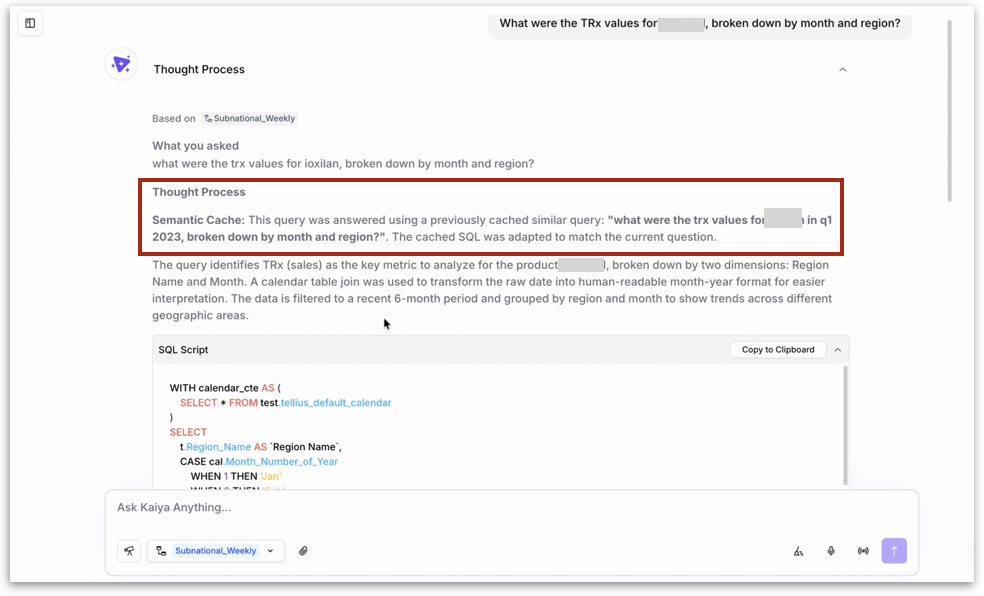
This means filter variations return correct, current results rather than stale cached output. A cached query for **`"TRx values for Product A in Q1 2023, broken down by month and region"`** can be adapted to answer **`"TRx values for Product B, broken down by month and region"`** without re-running the full resolution pipeline.
{% hint style="info" %}
When Semantic Cache is used, Kaiya indicates this in the **Thought Process** section. The **Thought Process** section displays a note highlighting **Semantic Cache,** followed by the original cached question text.
{% endhint %}
#### Scope of the cache
The cache is **shared per Business View, not per user**. When one user resolves a question, every other user querying the same BV benefits from the cached result going forward. Each user does not pay the full resolution cost independently. This is where the performance benefit compounds; the questions that slow down individual users tend to be the same questions the rest of the team is also asking.
#### When semantic cache helps most
Semantic Cache delivers the largest benefit on high-frequency questions where the analytical intent is the same across sessions even if the filter values change. Examples:
* "What were last week's TRx by territory?" — asked every Monday by multiple regional directors
* "Show top 10 products by revenue this quarter" — asked across sales and commercial ops
* "What is call coverage vs target for this week?" — pulled by field force managers daily
{% hint style="warning" %}
Whenever the underlying Business View is modified, the affected cache entries are automatically invalidated. The next question resolves fresh against the updated schema. Kaiya will never return a result built on SQL that references columns or relationships that no longer exist.
{% endhint %}
---
# Agent Instructions
This documentation is published with GitBook. GitBook is the documentation platform designed so that both humans and AI agents can read, navigate, and reason over technical content effectively. Learn more at gitbook.com.
## Querying This Documentation
If you need additional information that is not directly available in this page, you can query the documentation by asking a question.
Perform an HTTP GET request on the following URL with the `ask` and `goal` query parameters:
```
GET https://help.tellius.com/kaiya/kaiyas-persistent-memory/automatic-semantic-cache.md?ask=&goal=
```
`ask` is the immediate question: it should be specific, self-contained, and written in natural language.
`goal` is what the user is ultimately trying to achieve, the reason they need the answer. Sharing it helps GitBook give you a better, more relevant answer. A goal is most helpful when it describes the outcome the user wants rather than restating the question. For example, with `ask=how do I create an API token`, a goal like `automate deployments from our CI pipeline` lets GitBook tailor the answer to that use case.
The response will contain a direct answer to the question and relevant excerpts and sources from the documentation.
Use this mechanism when the answer is not explicitly present in the current page, you need clarification or additional context, or you want to retrieve related documentation sections.